
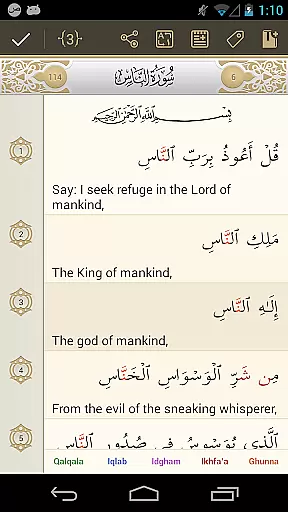
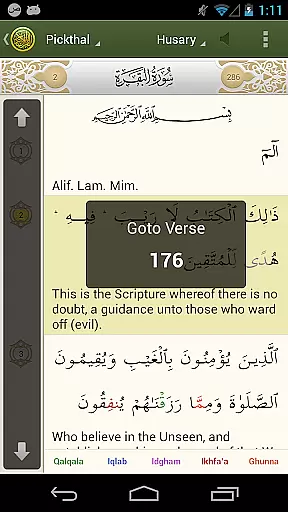
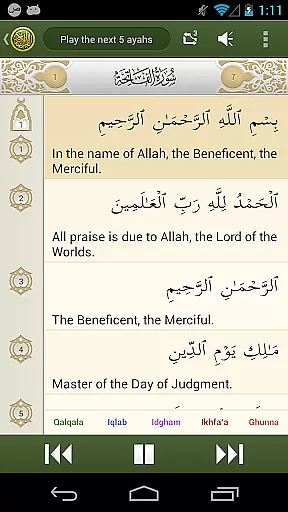
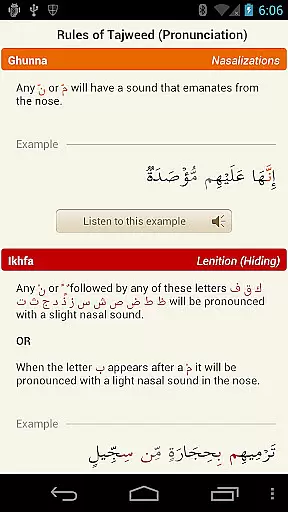

iQuran is a comprehensive Quranic reading and study app that offers users the ability to read the Holy Quran in Arabic alongside its translation. The app provides verse-by-verse audio playback, color-coded Tajweed rules for proper pronunciation, and a zoom-in feature to enlarge Arabic script. With full landscape support and excellent navigational controls, iQuran ensures an optimal reading experience on all Android devices.
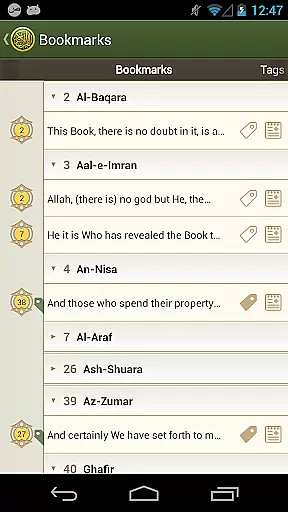
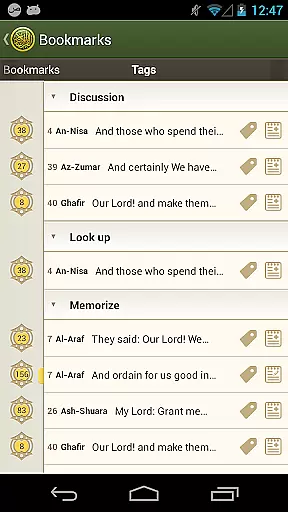
One of the standout features of iQuran is its unlimited bookmarks and tags with notes, allowing users to save and revisit important verses easily. The app also includes several translations in languages such as English, German, French, Indonesian, Urdu, and more, making it accessible to a global audience. Additionally, iQuran offers powerful audio controls with options for grouping verse playback, aiding in memorization, and providing several downloadable recitations from renowned reciters.
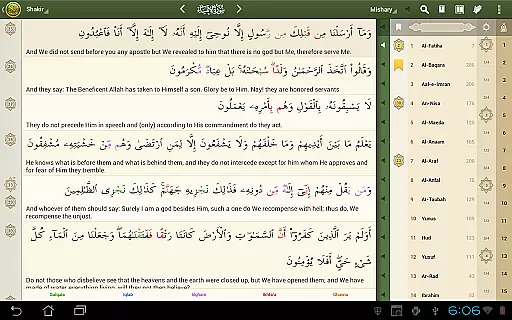
iQuran stands out with its unique features tailored for both casual readers and serious students of the Quran. One of its most notable features is the color-coded Tajweed rules, which are rendered live and help users pronounce Quranic text correctly. This feature is exclusive to iQuran, setting it apart from other Quranic apps. The app also supports a zoom-in function, enabling users to enlarge the Arabic script for better readability.
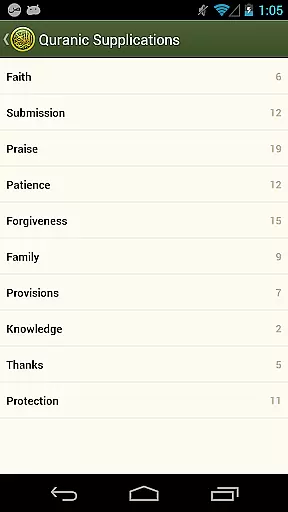
Another significant feature is the powerful full-text search engine, which allows users to quickly find specific verses or phrases within the Quran. iQuran also provides Quranic supplications and several downloadable recitations from famous reciters like Sheikh Husary, Mishary Al-Afasy, and Saood & Shuraim. These recitations support gapless/continuous playback, enhancing the user's listening experience. Moreover, the app includes excellent navigational controls and unlimited bookmarks, ensuring users can efficiently manage their study sessions.
The iQuran app offers an extensive e-book library that includes the Holy Quran in Arabic alongside its translations in multiple languages. This diverse collection ensures users have access to a wide range of linguistic interpretations, enhancing their understanding and engagement with the text.
Regarding copyright authenticity, iQuran provides translations and recitations from renowned scholars and reciters, ensuring that all content is both legitimate and authoritative. Users can trust the integrity of the material they are accessing for their spiritual and educational needs.
Moreover, the app supports features like color-coded Tajweed rules and zoom-in functionality for the Arabic script, enriching the reading experience. These tools not only expand the library's utility but also ensure that it caters to various learning styles and preferences.
By offering unlimited bookmarks, tags with notes, and excellent navigational controls, iQuran guarantees that users can effectively manage their study of the Quran. The powerful full-text search engine further enhances accessibility, making it simple for users to find specific verses or chapters within this vast digital library.
iQuran excels in format compatibility by providing verse-by-verse audio playback with several downloadable recitations. This feature supports gapless/continuous recitation for most reciters, allowing users to enjoy a seamless listening experience across different devices and Android versions.
In addition to audio formats, iQuran accommodates various textual formats through its inclusion of multiple translations. Whether you prefer English, German, French, Indonesian, Urdu, or other languages, the app delivers a consistent and adaptable user experience regardless of your chosen language.
The app also integrates advanced functionalities such as powerful audio controls and options to group the playback of verses. These capabilities aid in memorization and cater to individual learning preferences, demonstrating iQuran's commitment to comprehensive format support.
Furthermore, iQuran's design ensures full landscape support and requires minimal permissions, such as 'read phone state,' solely for operational purposes like pausing recitation during calls. This approach underlines the app's dedication to maintaining high standards of format compatibility while prioritizing user convenience and device performance.
Live Tajweed rules
Versatile translations
Excellent audio controls
Unlimited bookmarks
Powerful search engine
Paid application
Occasional bugs
Heavy on memory
Limited free recitations
No offline access for some content

Cute bedtime story for kids
 4.30
4.30
WebNovel - Read Solo Leveling novel and comic
4.10
Read popular romance books and web novels on the fantastic ebook reader
3.50
Werewolf novels & romance stories in audiobooks for book lovers! Werewolf storie
4.60
Liturgy of the Hours totally off-line
4.80
The Original & Authentic Crystals, Gemstones, Rocks & Minerals Encyclopedia.
4.60
All in one Calibre libraries on your phones and tablets.
3.80
America's best dictionary and thesaurus - with premium content and no ads
3.40
World's most comprehensive dictionary app: 13 languages, all online or offline!
4.80
A KJV Bible with Apocrypha and precept-based study concordance
5.00
"When tweetle beetles fight, it's called a tweetle beetle battle."
4.90
Daily rosary and gospel reflections for catholic
4.90
Bible, Catechism, Study, Saints, Mass Readings, Rosary, Prayer, Bible in a Year
4.80
The dynamic dictionary/reference app for piano chords and scales!
4.80
Read aloud texts, audiobooks, PDFs or any eBook with text to speech AI audio
4.60
Full text, sheet music, and recordings of the print edition
4.60
Pretty Moon information App with Complications and Tile
4.30
CleverBook Pro makes the popular guide for the game even better!
4.00
Read Trending Romance Stories
4.00


User Reviews