
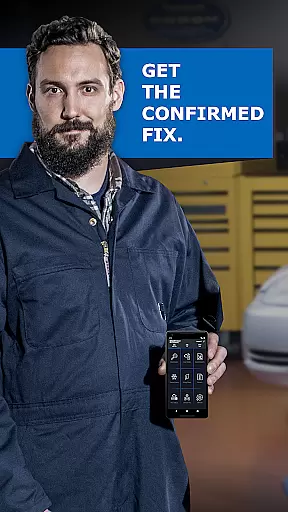
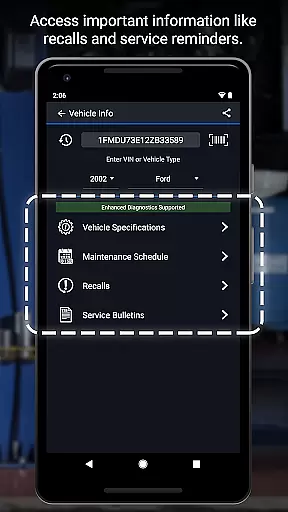
BlueDriver OBD2 Scan Tool is a professional-grade automotive diagnostic application that transforms your smartphone or tablet into an advanced vehicle scanning tool. Designed for both professional mechanics and DIY enthusiasts, this app pairs with the BlueDriver Bluetooth Sensor to provide comprehensive diagnostic capabilities without the need for wires or guesswork.
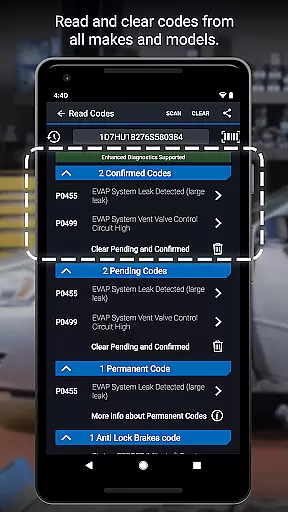
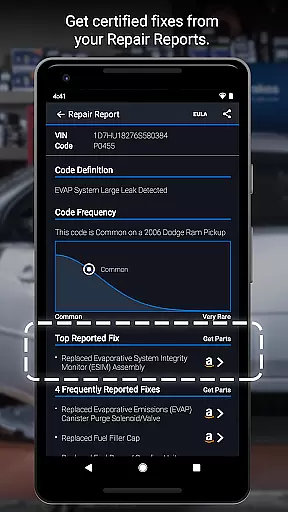
The app allows users to read and clear trouble codes across multiple systems including engine, ABS, airbag, and transmission. It also generates detailed Repair Reports specific to your vehicle's make, model, and year, helping you understand issues and make informed repair decisions. With features like Mode 6 test results, smog readiness checks, and live data graphing, BlueDriver offers a complete diagnostic solution for modern vehicles.
Whether performing routine maintenance or addressing check engine lights, BlueDriver provides clear, actionable information to help you maintain your vehicle with confidence. Its wireless Bluetooth connectivity and support for enhanced diagnostics on most major car brands make it an essential tool for vehicle owners worldwide.
BlueDriver stands out through its comprehensive feature set designed to simplify vehicle diagnostics. The app's core functionality includes reading and clearing diagnostic trouble codes from various vehicle systems, generating professional-grade Repair Reports, and providing access to advanced diagnostic data such as Mode 6 test results and freeze frame information.
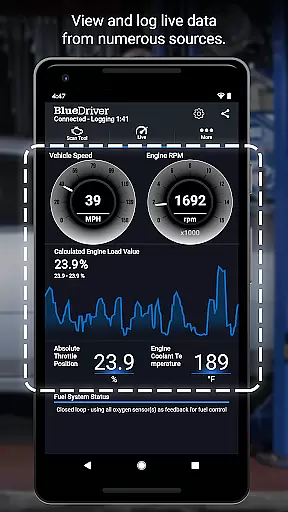
One of the app's key innovations is its wireless Bluetooth connectivity, eliminating the need for cumbersome cables while maintaining full diagnostic capabilities. Users can view live data streams with multi-PID interactive graphing, switch between metric and imperial units, and access likely fixes for their specific vehicle issues in plain language.
The app supports enhanced diagnostics for most major car manufacturers including GM, Ford, Toyota, and many others, with coverage varying by region. Its database of millions of real-world fixes and vehicle-specific reports ensures accurate, reliable information. The ability to preview Repair Reports without a sensor and seamless account synchronization across devices further enhances its practical value for vehicle owners and professionals alike.
BlueDriver OBD2 Scan Tool provides comprehensive access to detailed vehicle information, empowering users with precise diagnostic data. This includes the ability to read and clear trouble codes across multiple systems such as ABS, airbag, transmission, and more.
The app's enhanced diagnostics coverage supports a wide range of vehicle models from manufacturers like GM, Ford, Toyota, and Nissan, ensuring compatibility with most modern vehicles. By connecting wirelessly via Bluetooth, it delivers real-time data and multi-PID interactive graphing for an in-depth analysis of your car's performance.
Users benefit from professional-grade Repair Reports tailored to their specific vehicleu2019s year, make, and model. These reports not only help understand current issues but also guide future maintenance decisions by offering likely fixes explained in plain language.
One of the standout features of BlueDriver is its commitment to price transparency. Unlike many diagnostic tools that require subscriptions or recurring fees, BlueDriver offers a one-time purchase option for its sensor, making budgeting easier for users.
The app itself is free to install, allowing potential customers to explore its capabilities before committing to purchasing the accompanying sensor. This approach ensures users are fully aware of costs upfront without hidden charges or unexpected expenses during usage.
Additionally, BlueDriver provides valuable insights into repair costs through its database of millions of real-world fixes. Users can leverage this information to make informed decisions about whether to perform repairs themselves or seek professional assistance, ultimately saving both time and money.
User-friendly interface
Comprehensive diagnostic coverage
Wireless Bluetooth connectivity
Detailed Repair Reports
No subscription required
Sensor sold separately
Limited free features
Device compatibility issues
Occasional connection problems
Advanced features require premium sensor

ODB2 based monitoring application for the Chevy Bolt (2017-2021)
 4.00
4.00
Theme for Car Launcher
4.2
Read and delete OBD codes with any ELM327 OBD scanner. Coding functions included
3.40
By enthusiasts, for enthusiasts
4.00
Take state-specific DMV permit tests and ace the exam.
3.90
Find, search, and browse 40,000+ used cars, SUVs, and trucks.
4.50
O'Reilly Pro will streamline your parts lookup and ordering process!
3.20
Earn and save with Fuel Rewards®
3.20
Get price alerts, vehicle history details and more for cars near you!
4.50
7-Day Returns on All Cars
4.80
Oil change service & coupons for car maintenance at Valvoline Instant Oil Change
4.70
View your car’s service records and find out when maintenance is due.
4.70
Find Your Local Store or Shop Online for the Car, Truck, or SUV Parts You Need
4.70
Shop cars & see your financing
4.60
Autolist - The Largest Selection of Local Used Cars and Trucks
4.50
Secure mobile payments & fuel savings at Phillips 66®, Conoco® and 76® stations
4.40
Control maps, media and messaging, with the Google Assistant while you drive
4.10
App Mirroring for Tesla Car's Browser
2.80
Attention! This is the theme for the Car Launcher app
4.4


User Reviews