
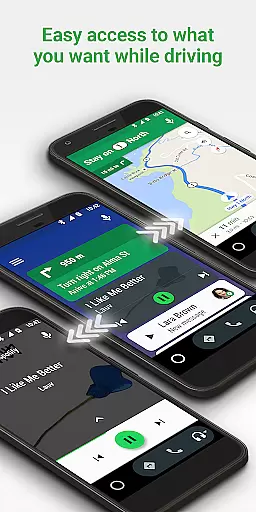
Android Auto is a driving companion app designed to keep you focused, connected, and entertained while on the road. It features a simplified interface with large buttons and powerful voice actions, making it easier to use your favorite phone apps while driving. The app integrates seamlessly with Google Maps, Waze, and the Google Assistant, providing real-time navigation, traffic alerts, and hands-free control.
This app is particularly useful for drivers who need to stay informed about their route, ETA, and potential hazards without taking their eyes off the road. With support for various media and messaging apps like Spotify, WhatsApp, and more, Android Auto ensures you remain connected and entertained during your journey. Its compatibility with over 400 car models makes it a versatile tool for modern drivers.
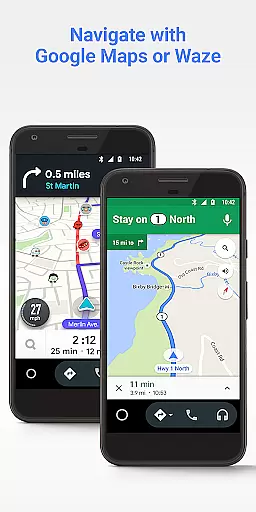
Android Auto boasts a range of features that enhance the driving experience. One standout feature is its integration with Google Maps and Waze, offering real-time GPS navigation and traffic alerts. This ensures you are always aware of the best routes and any potential delays.
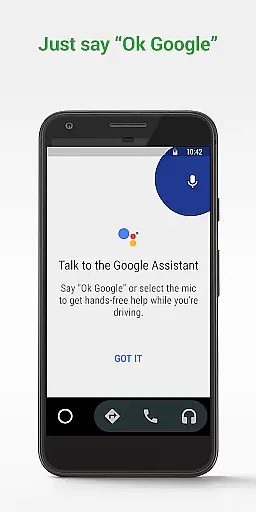
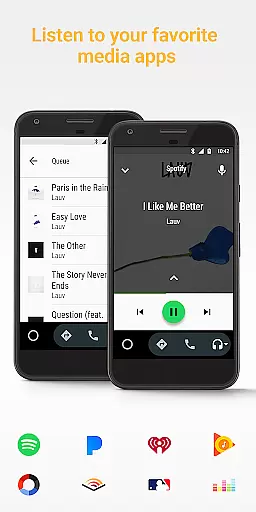
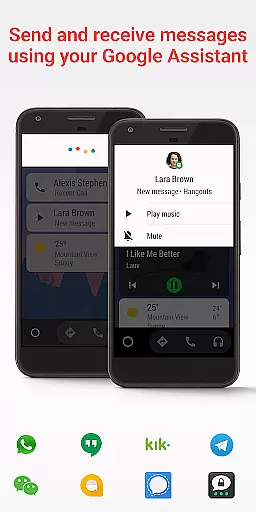
Voice actions powered by the Google Assistant allow you to make calls, send messages, and get updates on news or sports scores without needing to touch your phone. The app also supports a wide array of third-party services such as Spotify, Pandora, and WhatsApp, enabling you to manage your infotainment system like never before. These features collectively help minimize distractions and maximize safety while driving.
Accessing detailed vehicle information is crucial for drivers who want to stay informed about their car's status and performance. Android Auto provides essential details through its interface, ensuring that users can easily monitor their vehicle's parameters while driving.
The app integrates with your car's systems to display important data such as speed, fuel level, and engine temperature directly on the simplified dashboard. This seamless connection allows drivers to keep their focus on the road while still being aware of critical vehicle metrics.
By using Android Auto, drivers benefit from having all necessary vehicle information at a glance, without needing to take their eyes off the road. The large buttons and clear layout make it simple to navigate through different screens, providing an optimal user experience tailored for driving conditions.
This feature enhances safety by reducing the need for drivers to look away from the road or fumble with complex controls. With Android Auto's detailed vehicle information, you can maintain better control over your journey and respond promptly to any changes in your vehicle's status.
Price transparency in automotive services ensures that drivers are fully aware of costs associated with using navigation and entertainment features. Android Auto excels in providing clear information about potential expenses related to its various functionalities.
The application itself is free to use, but some connected services may require subscriptions or incur data usage charges. Android Auto clearly communicates these aspects through its settings and support pages, helping users understand what they might expect in terms of costs.
Users benefit from this transparency as it allows them to make informed decisions regarding which services to utilize during their drives. Whether it's choosing between different music streaming platforms or deciding on navigation options, knowing the cost implications beforehand enhances the overall user experience.
By maintaining price transparency, Android Auto builds trust with its users, ensuring they feel confident in using the platform without worrying about unexpected charges. This openness contributes significantly to a stress-free driving environment where financial surprises are minimized.
User-friendly interface
Voice command support
Real-time navigation
Wide app compatibility
Enhanced driving safety
Limited to Android devices
Requires active data
Dependent on car model
Needs USB connection
Some features may vary

Digital Car Key/Launcher, Screen Mirror, Android Dashboard, Remote Wireless Link
 4.40
4.40
Car Values, Research and More
4.80
By enthusiasts, for enthusiasts
4.00
Mobile Phone Parking - So easy to park
3.70
Find Your Local Store or Shop Online for the Car, Truck, or SUV Parts You Need
4.70
7-Day Returns on All Cars
4.80
Marathon ARCO Rewards members earn rewards & apply the rewards for fuel savings!
4.80
Easy connect & control your cars from afar. Remote Lock & unlock car and carplay
4.60
Browse millions of cars, track vehicle listings or sell your car today
4.70
Take Control of Your Car
4.80
Practice the drills within MotoJitsu Master Riding Program Volume 1 & 2!
4.80
The ExtraMile App allows you to pay for fuel from the comfort of your car!
4.70
Instantly redesign your car with AI. From sporty to futuristic, try it all.
4.50
Automotive Electrical Wiring Diagrams
4.40
Car Sounds Engine Sounds app welcomes Auto Lovers to feel Car Simulator Sound
4.20
Available in select states.
4.00
PayByPhone: A quick and easy way to pay for parking.
3.80
O'Reilly Pro will streamline your parts lookup and ordering process!
3.20
Theme for Car Launcher
4.3


User Reviews