
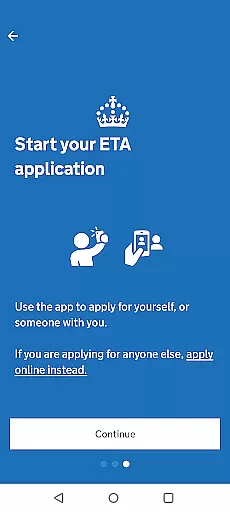
The UK ETA app provides a streamlined digital solution for travelers needing an Electronic Travel Authorisation to enter the United Kingdom. This innovative application simplifies the process by allowing users to apply directly from their mobile devices, ensuring convenience and efficiency.
Key features include passport scanning via NFC technology, facial recognition, and secure payment processing. The entire application process can be completed in approximately 10 minutes, making it ideal for travelers who require prompt authorization. With its robust privacy measures and commitment to security, the UK ETA app ensures that no personal data is retained on the device after use.
This app is particularly beneficial for tourists and business travelers who need to obtain travel clearance before their trip. By linking the approved ETA directly to the applicant's passport, it offers a seamless travel experience while maintaining high standards of safety and reliability.
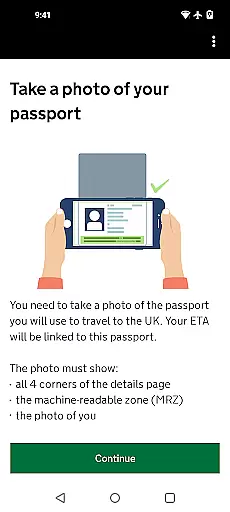
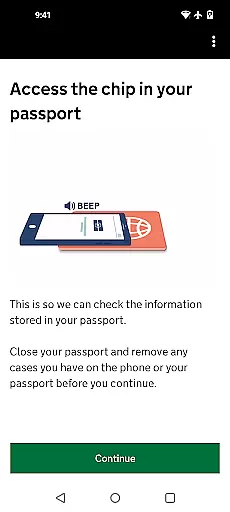
The UK ETA app stands out with its comprehensive set of features designed to facilitate a smooth application process. Users can conveniently capture images of their passports and utilize the phone's NFC capabilities to scan the embedded chip, ensuring accurate data entry.
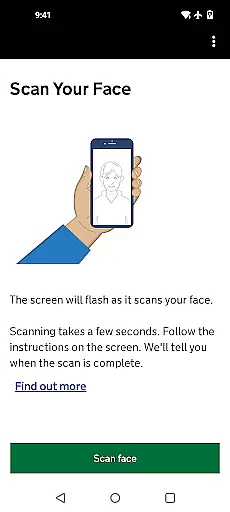
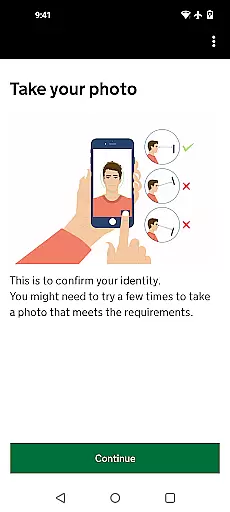
Another notable feature is the facial recognition functionality, which verifies the identity of applicants through a simple photo capture. This enhances security and expedites the verification process. Additionally, the app supports multiple payment methods including credit cards, debit cards, and Apple Pay, providing flexibility and ease of transaction.
Furthermore, the app emphasizes user privacy and data protection. No personal information is stored on the device post-usage, and users have the option to delete the app after completing their application. These features collectively contribute to a secure, efficient, and user-friendly experience, setting a benchmark for travel authorization apps.
Booking authenticity is a crucial aspect of any travel application, ensuring that the information provided during the booking process is accurate and trustworthy. The UK ETA app excels in this area by offering a streamlined and secure method to apply for an Electronic Travel Authorisation (ETA) to visit the UK. By utilizing advanced technologies such as NFC for passport scanning and facial recognition, the app verifies the applicant's identity with precision, thus guaranteeing the authenticity of each booking.
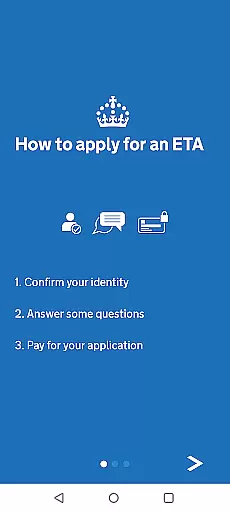
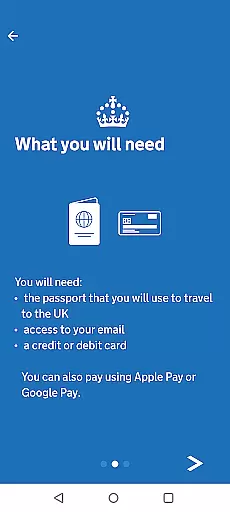
The app simplifies the application process into clear, manageable steps, starting from capturing a photo of the passport to answering personal questions and making the payment. This structured approach not only enhances user experience but also minimizes the chances of errors or fraudulent activities. Moreover, the requirement for applicants to possess specific prerequisites like Android 12 and above, a passport with an NFC chip, and a valid payment method further solidifies the legitimacy of bookings made through the app.
For users, the assurance of booking authenticity translates into peace of mind, knowing their travel authorization is processed correctly and securely. The app's commitment to privacy and security, where no data remains stored on the device after use, reinforces trust in the service. Consequently, travelers can focus on planning their journey confidently, assured that their ETA application is authentic and will be linked accurately to their passport for seamless entry into the UK.
Price transparency is essential for travelers seeking clarity about the costs involved in obtaining travel authorizations. The UK ETA app addresses this need by providing upfront information regarding the fees associated with applying for an ETA. Users are informed about the necessity of having a credit card, debit card, or Apple Pay ready before initiating the application process, ensuring there are no hidden charges or surprises along the way.
By integrating the payment step within the application workflow, the app maintains a transparent transaction environment. This straightforward approach allows applicants to understand exactly what they are paying for and how much it will cost them without navigating through complex pricing structures or encountering unexpected fees. Additionally, the app's design emphasizes efficiency, aiming to complete applications within just ten minutes, which adds value by saving users' time while maintaining financial openness.
Ultimately, price transparency benefits users by fostering trust and enabling informed decision-making. With all costs clearly outlined prior to submission, travelers can budget accordingly and proceed with their plans confidently. Furthermore, the reassurance that one can travel to the UK while awaiting a decision underscores the reliability of the ETA system facilitated by the app, enhancing overall satisfaction and confidence in using digital solutions for international travel preparations.
User-friendly interface
Quick application process
Secure transactions
Advanced facial recognition
Strong privacy measures
Requires Android 12+
NFC mandatory
Limited to certain passports
No offline functionality
Dependent on internet access

Book rooms at any of 4.2M properties worldwide. Find flight deals every day!
 4.60
4.60
Iowa 511 is the Iowa Department of Transportation's traveler information app.
3.80
Plan where to stand and shave minutes off your trip!
4.80
View US public land boundary maps on your device.
3.70
The official app of Allegiant Travel & Allegiant Airlines
3.30
Flight booking, hotel booking & more - all in one place with the Southwest App!
4.50
Travel and Book 8,000+ Hotels Worldwide with the Marriott Bonvoy™ app.
4.90
The United app puts valuable travel information in the palm of your hand.
4.70
Now you can book homes, experiences, and services—all in our redesigned app.
4.40
Rent the perfect car for wherever you’re going
4.90
Save on gas and convenience with the earnify™ App
4.70
Meet Allyz®, your ultimate travel companion
4.70
Take JetBlue everywhere you go! Book, manage and check in for your trips & more.
4.60
Stack Upside with your current credit & debit rewards for even more cash back!
4.50
Maps, Wait Times, Park Hours
4.40
Link & locate for real-time child & family safety: GPS tracker for families
4.40
Explore our parks like never before with the completely reimagined Six Flags app
4.30
The Official Freedom Trail Foundation app.
4.30
Everything you need for your trip in one place with the Volaris app.
3.60


User Reviews