
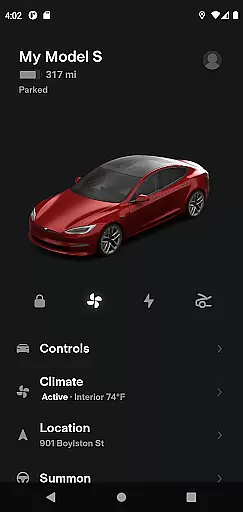
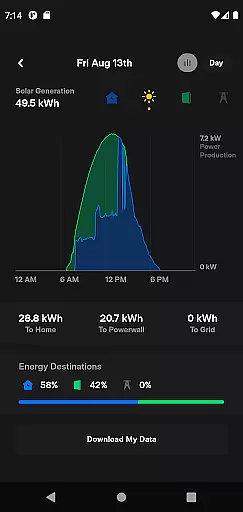
The Tesla app is a comprehensive lifestyle tool that allows vehicle owners to maintain constant contact with their Tesla cars and Powerwalls. This innovative application enables users to manage charging, climate control, security, and navigation remotely. Whether you're at home or on the go, the Tesla app provides unprecedented control over your vehicle's functions, making it an essential companion for Tesla owners.
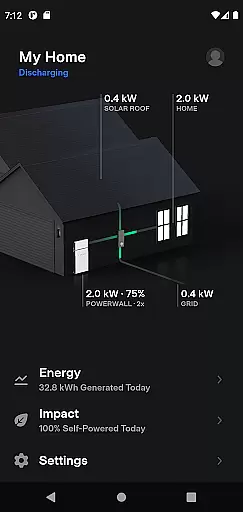
With features like remote charging management, climate preconditioning, and vehicle location tracking, the app ensures maximum convenience and peace of mind. Additionally, its integration with Powerwall systems allows users to monitor energy storage and usage, further enhancing the eco-friendly lifestyle that Tesla promotes.
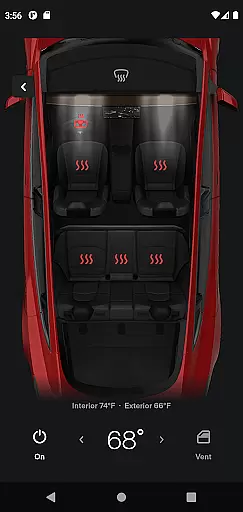
The Tesla app offers a wide array of features designed to enhance the ownership experience. Users can check the real-time charging progress of their vehicles and control the charging process directly from their smartphones. The app also allows for remote climate control, enabling owners to heat or cool their cars before driving, even when parked in a garage.
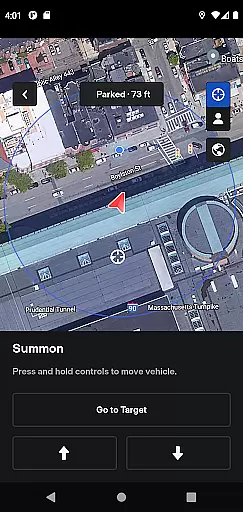
Security features include the ability to lock or unlock the vehicle from any distance, as well as locate it using GPS directions or track its movement. For added convenience, users can send navigation addresses from other apps directly to their vehicles and allow passengers to control media playback. Advanced functionalities such as summoning the car out of tight spaces and managing software updates remotely make this app a standout in the lifestyle category.
The Tesla app offers an extensive range of features that cater to various aspects of a user's lifestyle, ensuring comprehensive coverage of needs for both vehicle and home energy management.
With capabilities ranging from real-time vehicle charging monitoring to climate control and even Powerwall energy oversight, the app integrates seamlessly into daily life. This broad spectrum of functionalities allows users to manage their Tesla products efficiently, enhancing convenience and control over their personal and household energy solutions.
By providing tools for navigation, media control, and solar energy data tracking, the app ensures that users have all necessary lifestyle management features at their fingertips. These diverse options empower users to maintain optimal performance and efficiency across their Tesla ecosystem.
Tesla's app content is meticulously crafted and verified by experts in automotive and energy technologies, ensuring the highest level of authenticity and reliability.
Each feature within the app, from vehicle software updates to detailed solar production analytics, is developed based on Teslau2019s cutting-edge research and industry-leading expertise. This guarantees that users receive accurate, timely, and credible information about their vehicles and energy systems.
Furthermore, Tesla's commitment to transparency and quality is evident in how it allows users to download their energy usage data, reinforcing trust through verifiable and actionable insights provided directly by Tesla's team of specialists.
Comprehensive vehicle control
Real-time charging updates
Remote climate management
Enhanced security features
Seamless Powerwall integration
Requires Tesla vehicle
Powerwall 2 needed
Limited third-party support
Dependent on internet connectivity
Premium feature set

Chat, meet genuine singles in your area. Real connections start with being real.
 4.30
4.30
View over 160,000 line dance stepsheets from the CopperKnob website.
3.30
Material You inspired colors with BIG and Bold looks for Wear OS watches.
4.20
Customize your Wear OS watch with festive Christmas figures and colors!
4.4
Your home in your hand
3.80
Falling Fruit is a massive collaborative map of food in our cities.
3.20
An Eerie Musical Trigger Toy for Spirits to Play with!
3.50
A unique and customizable watch face which rotates its layout every minute.
4.80
Redecor your home with Home AI interior design, room planner and home designer.
4.50
Play. Earn. Repeat. Get rewarded for playing mobile games. Welcome to Mobius!
4.80
Get roadside help, discounts, travel tools & more — AAA is with you everywhere.
4.80
My Diary - Daily Journal with lock: Diary journal app and secret diary with lock
4.80
Tap to the beat with interactive videos — warm up your reflexes & have fun
4.70
Made To Order Faves
4.70
This app is intended to support professional EMDR therapy.
4.50
Earn money & gift cards when you take surveys, play games, scan receipts & more.
4.50
This minimalist yet classic board design brings a futuristic twist to your wrist
4.20
Discover how to help puppies stay calm around noise with this helpful app.
4.5
Big bold hybrid watch face with 30 colors, 5 fonts & 5 complications.
4.1


User Reviews