
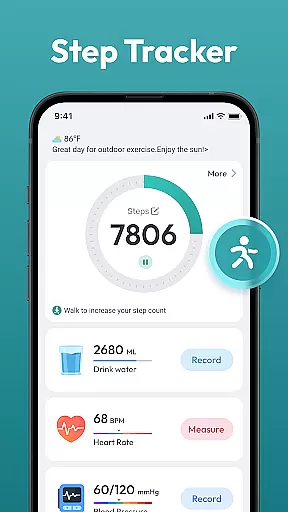
Step Counter - Pedometer App is a comprehensive health and fitness tool designed to help users track their daily physical activity. This app automatically counts steps, measures walking or running distance, and supports setting goals such as reaching 10,000 steps per day.
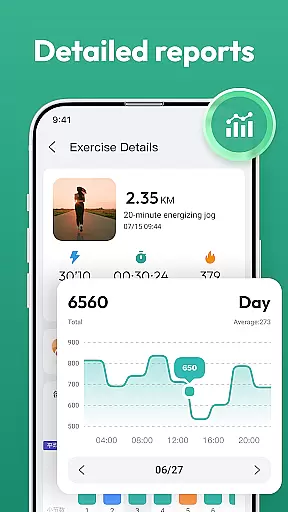
In addition to basic step tracking, the app provides detailed activity reports through daily, weekly, and monthly charts. It also offers training programs and plans to guide users in achieving their fitness objectives, making it suitable for all ages and fitness levels.
Whether you're aiming to lose weight, maintain a healthy lifestyle, or simply monitor your movement throughout the day, this app serves as a reliable companion without requiring any additional wearable devices.
Step Counter - Pedometer App stands out with its automatic step counting feature that works seamlessly on most Android devices. The app tracks various health metrics and presents them through intuitive charts, allowing users to visualize their progress over time.
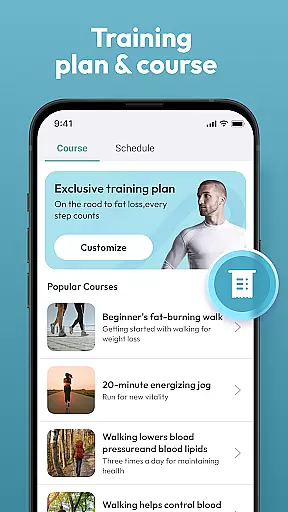
One of the key highlights is the inclusion of personalized training courses and plans tailored to individual fitness goals. These features ensure that users can follow structured guidance while staying motivated.
The user-friendly interface makes navigation effortless, enabling users to access all essential functions with ease. By keeping your phone in a pocket or bag, the app reliably records every step, providing an accurate and hassle-free way to monitor physical activity.
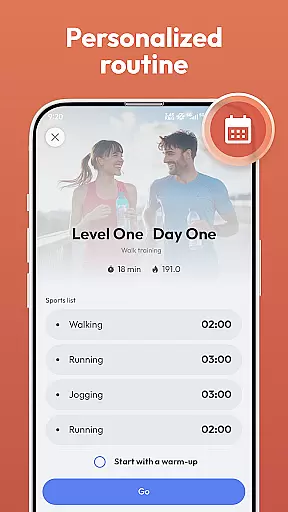
Personalized planning in a fitness app refers to the ability to create tailored workout and activity plans based on individual user data. This feature is crucial for maintaining user engagement and achieving optimal health outcomes.
Step Counter - Pedometer App offers personalized planning through its training courses and plans. The app analyzes your daily activity, such as steps taken and distance covered, to suggest achievable goals and plans that align with your fitness objectives. Whether you aim to lose weight or stay active, the app adapts its recommendations to suit your needs.
Users benefit from this feature by receiving customized guidance that matches their fitness levels and goals. The app's ability to track various health data ensures that the plans remain relevant and effective over time.
The true value of personalized planning lies in its adaptability. As users progress, the app adjusts its suggestions, ensuring continuous improvement and motivation. This dynamic approach helps users stay committed to their fitness journey.
Progress visualization is an essential feature in fitness apps, allowing users to see their achievements and improvements over time. Visual representations of data help users understand their progress and stay motivated.
Step Counter - Pedometer App excels in progress visualization by providing daily, weekly, and monthly charts. These charts display step counts and other health metrics, giving users a clear picture of their activity trends. The app automatically tracks achievements, making it easy for users to monitor their fitness milestones.
By visualizing their progress, users can identify patterns and make informed decisions about their health routines. The app's automatic tracking ensures that all achievements are recorded accurately without requiring manual input.
This feature significantly enhances user engagement by celebrating milestones and encouraging consistent activity. With clear visual feedback, users are more likely to stick to their fitness goals and maintain a healthy lifestyle.
Automatic step tracking
User-friendly design
No extra devices needed
Detailed progress charts
Free to use
Limited to Android
Requires phone carry
Battery consumption
No advanced metrics
Basic UI design

Home workouts for fitness & fast bodybuilding at home - no equipment needed.
 4.90
4.90
Optimization for TRT & Enhanced Athletes
4.1
Use your watch as a bike computer, heart rate monitor and cycling power meter
2.50
50 HD sounds to help you relax during the day and sleep great at night!
4.40
Protect your healthy sleep
4.80
The Official Blood Type Diet® App - know your categorized foods anytime.
4.50
Fast Body building & Weight Loss. Home Workouts with Daily Coach, No Equipment.
4.30
Lazy home workouts with your virtual fitness coach for weight loss.
4.30
Control your blood pressure, heart rate and blood sugar in a fast way.
4.00
Meditation app, head space app provides calm music to help you meditate & sleep
5.00
Power-lifting, weightlifting and Wendler 531 app to track your workout program.
4.90
A brain game that moves you
4.70
Blood Pressure Log, HRV & Heartbeat Tracker. Pulse Checker.
4.40
Pack of 66 calming lullabies for smooth fall asleep and relaxation
4.10
Your personal BP tracking companion, focus on helping you achieve wellness goal.
4.10
beat yesterday.
4.00
Your Health Assistant
3.90
Make sense of your health data.
3.80
Focus on BP & Health
3.80


User Reviews