
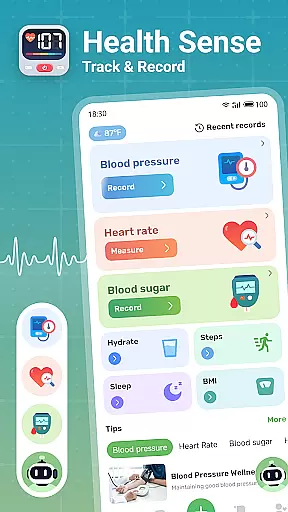
Health Sense is a comprehensive health tracking application designed to help users monitor key health metrics. The app allows you to track important indicators such as blood sugar levels, blood pressure, heart rate, and BMI in an efficient and user-friendly manner. With its intuitive interface, users can easily input their health data anytime, anywhere.
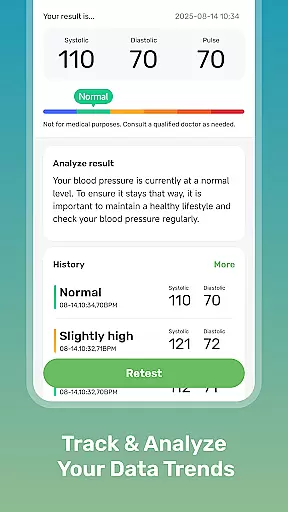
Beyond basic tracking, Health Sense provides personalized health insights through detailed charts and graphs that display trends over time. This feature enables users to observe fluctuations in their health metrics and make informed decisions about their well-being. Whether you're managing diabetes or simply maintaining general health, this app serves as a valuable tool for staying on top of your health goals.
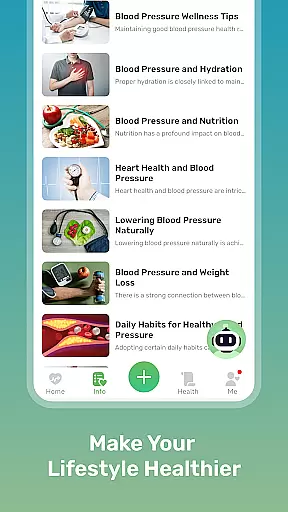
The app also includes educational content focused on scientifically-backed health knowledge, offering tips and dietary advice related to blood sugar management, cardiovascular health, and more. While not intended for medical diagnosis or emergencies, Health Sense empowers users with the information needed to support long-term wellness.
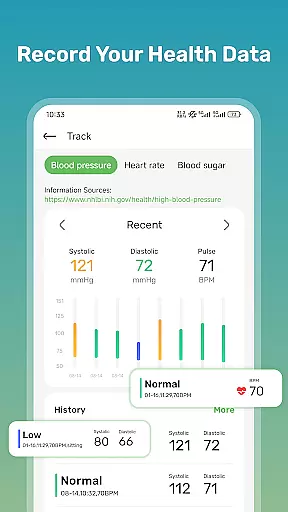
One of the standout features of Health Sense is its ability to create a personalized health diary for each user. Every entry of systolic, diastolic, pulse, blood glucose, steps, and water intake is automatically logged and visualized in easy-to-understand charts. These visual aids allow users to quickly identify patterns and trends in their health metrics, empowering them to take proactive steps toward better health.
In addition to tracking capabilities, Health Sense offers a wealth of resources aimed at educating users about various aspects of health. From tips on managing blood sugar to advice on improving heart health, the app provides reliable, science-based content. Users will find helpful hints and dietary recommendations that can assist in achieving both short-term and long-term health objectives.
Another notable feature is the app's simplicity and accessibility. Its clean design ensures that even those who are less tech-savvy can navigate and utilize the app effectively. By combining robust tracking tools with educational materials, Health Sense delivers a holistic approach to personal health management.
Personalized planning in health applications refers to the ability to create tailored health strategies based on individual user data. Health Sense: Track & Record excels in this area by offering personalized tracking options for blood sugar, blood pressure, heart rate, and BMI.
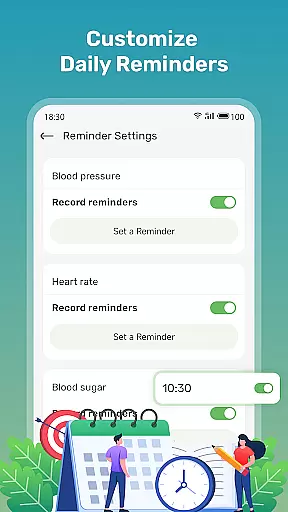
The app achieves personalized planning through its adaptable input interface that allows users to log various health metrics at their convenience. This feature supports the recording of systolic and diastolic blood pressure, pulse, blood glucose levels, daily steps, and water intake, providing a comprehensive overview of the user's health status.
Users benefit from this feature as it enables them to observe trends and patterns in their health data over time. With clear graphs and trend analysis, individuals can better understand their health fluctuations and make informed decisions to maintain their levels within a healthy range.
This personalized approach not only assists users in managing their current health conditions but also empowers them with insights for long-term health improvements. By having a personalized health diary, users can actively engage in their health management journey.
Progress visualization is a crucial component of health and fitness apps, allowing users to see their advancements and stay motivated. Health Sense: Track & Record provides an intuitive progress visualization feature that displays all tracked health data in easy-to-understand charts.
The application creates a visual representation of the user's health metrics such as blood sugar, blood pressure, heart rate, and BMI trends. These dynamic charts update with each new entry, giving users immediate feedback on their health progress and helping them to control their levels effectively.
With this feature, users gain a clearer understanding of how different aspects of their lifestyle affect their health metrics. The ability to visually track important health data like steps and water intake further enhances the user's capability to maintain a balanced and healthy lifestyle.
Ultimately, progress visualization stands as a testament to the user's health journey, providing both motivation and a sense of accomplishment. This visual tool is indispensable for users seeking to make lasting changes to their health habits and maintain their progress over time.
User-friendly interface
Comprehensive health tracking
Detailed progress charts
Educational health content
Personalized health diary
No medical device certification
Limited emergency support
Potential LED overheating
Cannot measure blood pressure
Relies on manual data entry

Chair Workout: Women's Edition for safe, flexible, and personalized fitness.
 4.40
4.40
sobriety counter app to help and motivate people to stop drinking alcohol.
4.90
Get lasting results with Chair Yoga, Wall Pilates, and Walking workouts!
4.60
Walk. Earn: Get rewarded for every step! Walk, move, and earn real rewards.
4.70
Monitor, analyze, track, and convert blood sugar & help you control diabetes.
4.10
Walk, track, and burn calories with step counter & GPS walking tracker
4.20
Point, scan, and unlock truth in every bite.
4.50
Focus on BP & Health
3.80
Manage your and your family's health information.
4.60
Beauty Care, Makeup & Skin Care Scanner | Pregnancy App For A Mom | Healthy Baby
5.00
Show your support for the development of FitNotes - Gym Workout Log
4.90
Easy access to health benefits
4.70
Memory, mind & logic exercises. Puzzle games, IQ & brain test for kids & adults
4.50
Relax to calm sounds, white noise, music, guided meditation and bedtime stories
4.40
Blood Pressure Log, HRV & Heartbeat Tracker. Pulse Checker.
4.40
This is an application that serves as a companion app for smart watch.
4.20
beat yesterday.
4.00
SportWerks - Workout Tracker for Wear OS Watches
3.90
Live Heart Rate Pro - Real Time Heart & Workout Data For Wear OS & Bluetooth BLE
3.20


User Reviews