
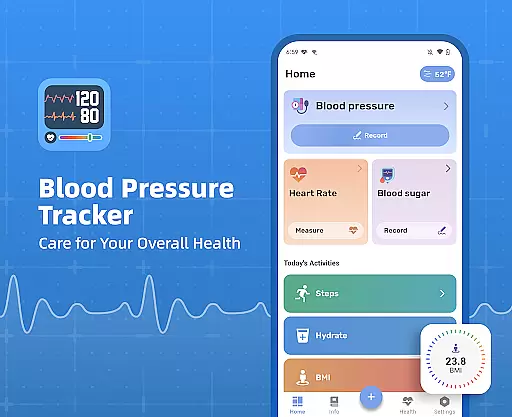
Blood Pressure Tracker is a comprehensive health monitoring application designed to help users manage their blood pressure, heart rate, and blood sugar levels effectively. The app provides a fast, simple, and safe way to track these vital health metrics.
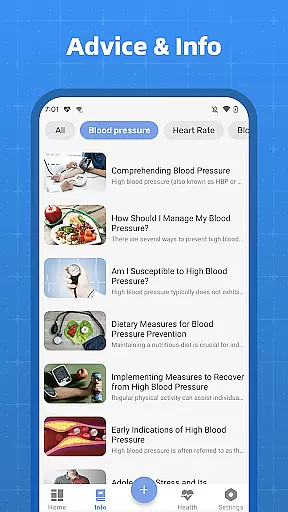
With features tailored for individuals who need regular monitoring but may occasionally forget, the app replaces traditional paper-based recording with digital precision. It helps users determine if their readings fall within normal ranges and offers scientific guidance on maintaining a healthy lifestyle. Additionally, it allows users to display their health trends to doctors, making medical consultations more informative.
The Blood Pressure Tracker stands out with its user-friendly interface and robust functionality. Users can easily log their blood pressure, blood sugar, and pulse readings, receiving instant feedback on their health status.
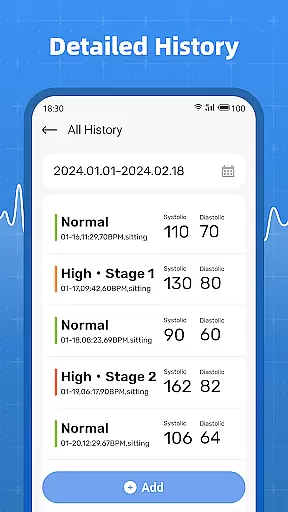
Beyond basic tracking, the app provides detailed analytics on various health parameters including water intake, steps, and BMI. This holistic approach ensures users have a clear understanding of their overall health. The historical data feature allows users to identify subtle changes over time, empowering them to take proactive steps towards better health management.
Personalized planning in health applications refers to the ability to tailor health tracking and management according to individual user needs. Blood Pressure Tracker excels in this area by offering users the capability to record not just blood pressure but also heart rate, blood sugar levels, water intake, steps, and BMI.
The app's design focuses on accommodating the specific health monitoring requirements of its users. For instance, it provides clear analysis tools that help individuals uncertain about their normal ranges to track and understand their vital signs better. This personalized approach ensures that every user can manage their health metrics according to their unique situation.
Users benefit significantly from this feature as it empowers them with actionable insights into their health trends over time. By having all relevant data in one place, users can easily monitor changes and make informed decisions regarding their lifestyle or treatment plans.
This level of personalization is invaluable for those who need to maintain a close watch on their health indicators and share accurate historical data with healthcare providers during consultations.
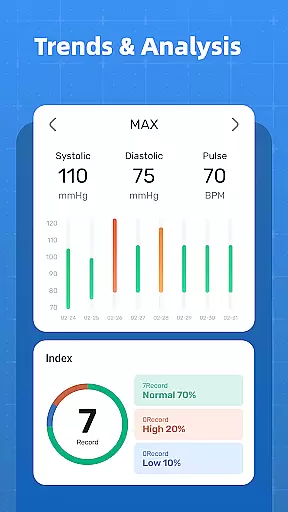
Progress visualization is a critical component of any fitness or health app, allowing users to see their improvements and maintain motivation. Blood Pressure Tracker offers robust visualization tools that display the history of all measurements, making it easy for users to spot trends and subtle changes in their health metrics.
With clear graphs and charts, the app presents blood pressure, blood sugar levels, pulse, and other tracked data in an easily digestible format. This visual representation helps users quickly identify patterns or anomalies in their readings, prompting timely action towards better health management.
The advantage of such visualization is significant; users no longer need to rely on memory or manual logs as they have instant access to their health history. This accessibility supports more productive discussions with healthcare professionals when displaying blood pressure conditions and changes.
By providing a straightforward way to observe progress, Blood Pressure Tracker enhances user engagement and encourages continued use, which is essential for long-term health monitoring and improvement.
User-friendly interface
Comprehensive health tracking
Instant health feedback
Detailed analytics
Accessible history records
No direct measurement capability
Limited to manual input
Premium features may require subscription
Occasional syncing issues
Dependent on user consistency

The simplest way to track your 21 Day Program containers, exercises, and water.
 4.50
4.50
Build Healthy Habits!
4.60
Measure real-time wrist & ambient temperature with your Galaxy Watch (Wear OS)
3.20
Memory, mind & logic exercises. Puzzle games, IQ & brain test for kids & adults
4.50
Your Health Assistant
3.90
Point, scan, and unlock truth in every bite.
4.50
Pedometer that gives you sweatcoins for steps. It pays to walk!
4.10
Monitor blood sugar, gain insights, and manage diabetes with ease.
3.20
Scan food & cosmetic products and evaluate their impact on your health
4.80
Meditation app, head space app provides calm music to help you meditate & sleep
5.00
You deserve easy access to important insurance information. Download for FREE.
4.70
The Crunch Mobile app - Find a gym, manage favorites, reserve & cancel classes.
4.60
Relax. Sleep Better. Feel Better.
4.50
The most accurate heart rate app to monitor and track your heart rate & pulse.
4.40
Grow with self-tests and personal routine.
4.30
Your portable blood pressure tracker. Record, monitor, and analyze BP anytime.
4.30
Create powerful subliminal audio with custom affirmations and background music.
4.00
beat yesterday.
4.00
The app helps you address digestive symptoms based on the Fast Tract Diet.
3.50


User Reviews