

Kid Security is a cutting-edge parental control app designed to ensure child safety both online and offline. It offers tools for monitoring children's surroundings, managing their digital experiences, and tracking their locations. The app allows parents to listen to ambient sounds around the child's phone, providing insights into their physical environment. With features like GPS tracking, geofencing, and content restriction, Kid Security empowers parents with comprehensive oversight.
The app integrates essential functionalities such as real-time location tracking, safe zone alerts, and usage statistics for apps and websites. Its intuitive interface ensures ease of use, allowing parents to configure settings efficiently. By installing the Tigrow app on the child's device, parents can access all these features seamlessly. Kid Security is a complete solution that bridges digital monitoring with real-world safety, offering peace of mind to parents.
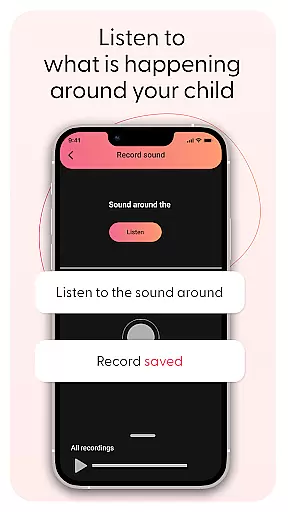
Kid Security stands out with its innovative features tailored for proactive child safety. One key feature is the ability to listen to surrounding sounds around the child's phone, giving parents valuable insights into their immediate environment. This functionality helps identify potentially unsafe situations and reassures parents about their child's well-being.
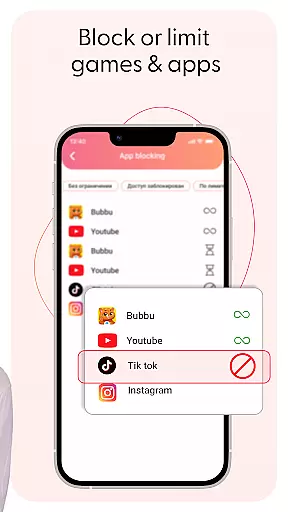
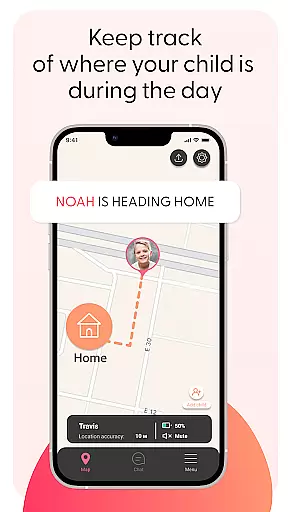
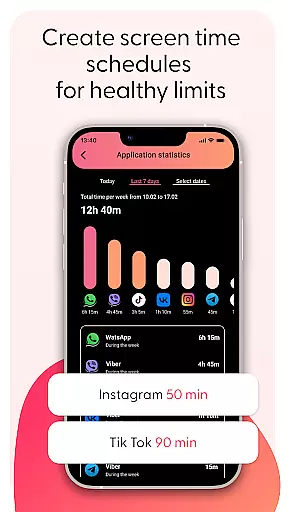
The app provides robust parental controls, enabling parents to manage and restrict access to inappropriate content. Parents can block specific apps or categories and monitor usage statistics. Additionally, GPS tracking and geofencing capabilities allow parents to set up safe zones and receive instant alerts when boundaries are crossed. These features work together to create a secure environment both digitally and physically.
When it comes to parenting applications, the credibility of content and expert validation form the backbone of user trust. Kid Security stands out in this aspect by offering features that are not only innovative but also grounded in child safety expertise. The app provides a comprehensive suite of tools designed with the guidance of child safety professionals, ensuring that every feature serves a meaningful purpose in protecting your child.
The surrounding sound monitoring functionality exemplifies this commitment to expert-backed features. This tool isn't just about technology; it's about creating a bridge between digital monitoring and real-world safety. Developed with insights from child psychologists and safety experts, this feature allows parents to make informed decisions about their child's environment. It transforms ambient sound into actionable intelligence, providing peace of mind that goes beyond mere location tracking.
Moreover, Kid Security's approach to parental controls demonstrates deep understanding of both digital threats and child psychology. The app doesn't merely block inappropriate content u2013 it employs sophisticated filtering mechanisms developed through years of research in online child safety. Each blocked website or restricted application reflects careful consideration of age-appropriate content guidelines established by child development specialists.
Parents can trust that every alert received, whether it's a geofence notification or an app usage report, is backed by professional standards in child safety. The integration of GPS tracking with behavioral monitoring creates a holistic safety ecosystem that addresses both physical and digital well-being. This dual focus on environmental safety and digital protection makes Kid Security a leader in expert-validated parenting solutions.
While primarily focused on safety, Kid Security also excels in growth tracking accuracy, providing parents with valuable insights into their child's developmental journey. The app's sophisticated algorithms track not just physical movements but also digital behavior patterns, painting a comprehensive picture of a child's daily activities and growth milestones. This data-driven approach helps parents understand their child's evolving needs and habits.
The app's geolocation features contribute significantly to growth tracking by mapping a child's expanding world. As children grow, their safe zones naturally increase. Kid Security's geofencing capabilities adapt to these changes, allowing parents to monitor how their child's independence develops over time. The system accurately records when children start exploring new areas, providing timestamped data that reflects their growing confidence and mobility.
Digital growth tracking is equally robust, with detailed reports on app usage and website visits. These analytics aren't just numbers u2013 they represent developmental markers in a child's digital life. The app categorizes digital activities by type and duration, helping parents identify patterns that might indicate important developmental stages or potential concerns. This granular tracking extends to screen time management, where precise hourly breakdowns reveal how digital habits evolve.
All collected data points are processed through advanced analytical systems that maintain exceptional accuracy while respecting privacy boundaries. Parents receive regular reports that combine location history with digital activity summaries, creating a comprehensive growth profile. These insights, presented through intuitive graphs and charts, enable parents to make informed decisions about gradually increasing independence while maintaining appropriate safeguards. The result is a scientifically-backed growth tracking system that evolves alongside the child.
Comprehensive safety features
User-friendly interface
Real-time location tracking
Proactive monitoring tools
Robust parental controls
Requires additional app installation
Premium features may incur cost
Privacy concerns with microphone access
Limited without child's device
Dependent on internet connectivity

Daily Routine & Timer for kids, ADHD, & Autism
 4.80
4.80
All-in-one pregnancy app, contraction timer, kick counter & due date calculator
4.40
Track Pregnancy, Baby Feeding, Sleep, Diaper Changes, Postpartum Health & More!
4.80
Protect kids online safety through GPS tracking,screen time control,app blocking
4.20
The 10 development leaps of your baby | newborn milestones & leap days tracker
4.10
GeoLog - Real-Time Location Tracker
4.40
Screen Time, App and Web Block & Monitoring, Location Tracker
3.60
All-In-One Pregnancy Tracker, Your Baby's Milestones, Growth Stages & Parenting.
4.90
Monitor screen time and build healthy habits with Family Safety
3.90
A simple way to track your baby’s breastfeeding, diaper changes, sleep patterns.
4.90
Track baby’s development & growth week by week with BabyCenter’s pregnancy app!
4.90
Advanced baby tracking, expert sleep help & parenting support for every stage.
4.80
Live Location, Alerts & 2-Way Voice for Kids and Adults with Special Needs
4.60
The Most Trusted Co-Parenting App.
4.60
Block apps, set screen time limits, and customize usage schedules
4.50
Free symptom & med tracker with expert-reviewed tips.
4.30
Fake call application designed for parents and adults to discipline their children through the children's police.
4.20
Affirmations | Stories | Bible
4.10
A Coloring for the Whole Family! Discover the Joy of Family Love Through Colors!
3.60


User Reviews