
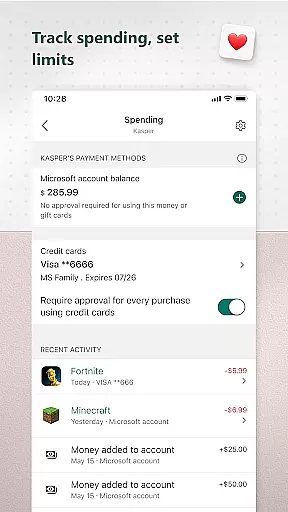
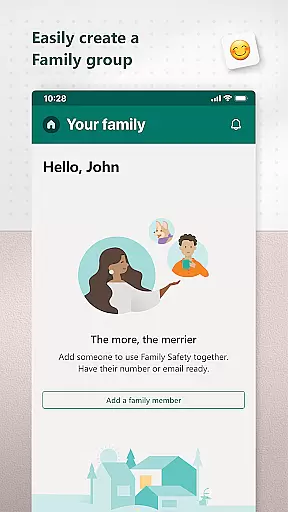
Microsoft Family Safety is a comprehensive parenting app designed to help families develop healthy digital habits while ensuring online safety. The app provides parents with essential tools to manage their children's screen time, set content filters, and monitor activity across multiple devices including Android, Xbox, and Windows.
Key features include detailed activity reports that provide insights into children's digital usage, customizable screen time limits for apps and devices, and robust content filtering options. Parents can create a safe browsing environment by enabling kid-friendly web filters on Microsoft Edge and blocking inappropriate apps and games. The app also facilitates open communication through weekly email summaries that help start meaningful conversations about online behavior.
This application serves as a bridge between parental control and child independence, allowing kids to safely explore the digital world while giving parents peace of mind. The app's privacy-focused approach ensures that family data remains secure, with clear choices about data collection and usage.
Microsoft Family Safety offers an impressive array of features that cater to both parents' and children's needs in the digital space. The app's activity reporting system provides detailed logs of screen time and online usage, complemented by weekly summary emails that help parents understand their family's digital patterns without intrusive monitoring.
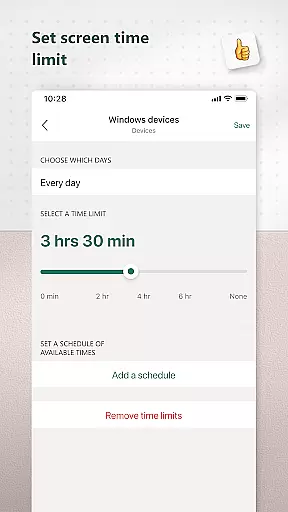
The screen time management feature stands out with its flexible controls. Parents can set specific time limits for individual apps and games across different platforms, including Android devices, Xbox consoles, and Windows computers. The device-level screen time limits offer additional control by enabling daily schedules and bedtime routines across multiple devices simultaneously.
Content filtering capabilities ensure a safer online experience through Microsoft Edge's kid-friendly browsing mode and robust app/game blocking mechanisms. The app's permission system is designed with transparency in mind, requiring explicit consent from children before collecting interaction data. This approach maintains a balance between necessary oversight and respecting children's digital autonomy while providing parents with the tools they need to keep their family safe online.
Microsoft Family Safety provides a reliable and credible solution for parenting in the digital age. The app is designed with input from experts in child safety and digital wellness, ensuring that the features offered are both effective and appropriate for families.
The app's content filters are developed based on industry standards and best practices for online safety. These filters help parents block inappropriate apps and games while promoting kid-friendly browsing experiences through Microsoft Edge. This ensures children can explore the internet within safe boundaries.
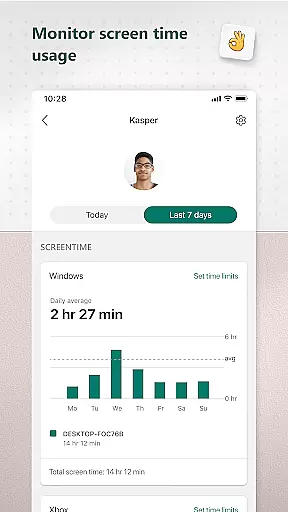
Activity reports provide parents with detailed insights into their children's screen time and online activities. These reports are generated using accurate tracking mechanisms that give a clear picture of how digital devices are being used, empowering parents to guide their kids effectively.
Microsoft takes privacy seriously, offering meaningful choices about data collection and usage. With transparent privacy policies and robust security measures, parents can trust that their family's data is handled responsibly, reinforcing the credibility of the app as a reliable parenting tool.
Growth tracking in Microsoft Family Safety focuses on helping parents monitor and manage their children's digital habits accurately. The app provides precise activity logs that detail screen time and app usage, giving parents a comprehensive view of their child's digital footprint.
Screen time limits can be set across multiple devices, including Xbox, Windows, and Android platforms. This cross-device management ensures consistent tracking of a child's interaction with technology, allowing parents to enforce balanced usage effectively.
Parents receive weekly email summaries that offer an overview of their children's digital activities. These reports enable parents to track growth patterns over time and make informed decisions about adjusting screen time allowances or discussing online behaviors.
With real-time notifications when children request additional screen time, parents have accurate control over adjustments. This feature supports ongoing growth assessment by keeping parents actively involved in managing their children's digital development.
Comprehensive cross-platform support
Detailed activity reporting
Flexible screen time controls
Robust content filtering
Transparent privacy policies
Limited iOS functionality
Requires Microsoft account
Some features are complex
Dependent on Edge browser
Third-party app limitations

Daily Routine & Timer for kids, ADHD, & Autism
 4.80
4.80
Discover fun videos, kids songs, bedtime stories and games
3.60
All-in-one pregnancy app, contraction timer, kick counter & due date calculator
4.40
Parental Control including Screen time control, GPS tracking, App/Game blocker.
3.90
Pregnancy and baby formula tips for moms, plus Enfamil coupons & cash back
4.10
Track your pregnancy, kick & contraction counter, baby & mom's heartrate monitor
4.60
Affirmations | Stories | Bible
4.10
Watching baby, helping parents
4.10
Parental control App for Location, Remote Camera, Screen Mirroring, Block Apps.
4.60
3D Baby size, Fruit comparisons, Smart Checklist, Trending Names & Training.
4.90
Pinardin - Smart Parental Control, Online Safety & GPS Tracking!
4.80
Pregnancy+ App has helped 80m moms track their pregnancy with info & support!
4.80
Advanced baby tracking, expert sleep help & parenting support for every stage.
4.80
FamilyAlbum helps you share, save, and remember your child's special moments.
4.80
GPS phone tracker: find kids on map. Location tracking and parental control.
4.50
Cherish every beat - capture your baby's heart sounds with our app
4.30
FamilyMode helps you manage your family’s digital lives—at home or on the go.
4.30
Keep Your Family Safe with Pollog Family Assistants
4.10
A Coloring for the Whole Family! Discover the Joy of Family Love Through Colors!
3.60


User Reviews