
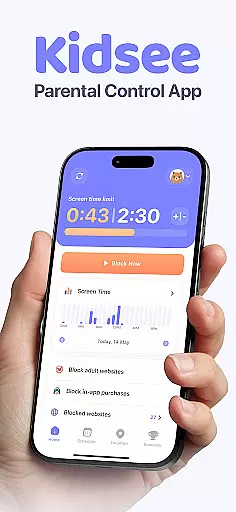
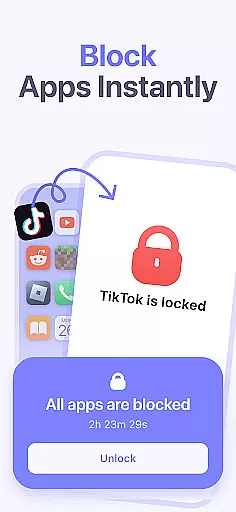
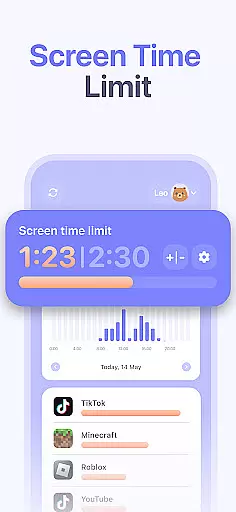
Kidsee Parental Control is a comprehensive family safety solution designed to help parents manage their children's digital habits while ensuring their safety. The app offers flexible screen time controls, allowing parents to set daily limits, block specific apps, and create custom schedules for different occasions like school days or weekends.
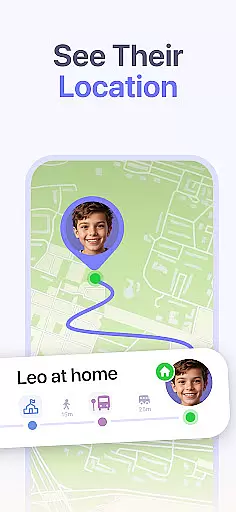
In addition to screen time management, Kidsee provides real-time GPS tracking and location history, giving parents peace of mind about their child's whereabouts. The app also helps protect children online by automatically blocking adult content and enabling parents to manually restrict specific websites. With support for multiple child devices and cross-platform compatibility, Kidsee is an all-in-one solution for modern families.
This parental control app is particularly useful for families with children who have smartphones or tablets, as it promotes healthy device usage and digital wellbeing. Parents can remotely monitor and control their child's device usage from their own phone, making it an essential tool for safeguarding both physical and digital safety.
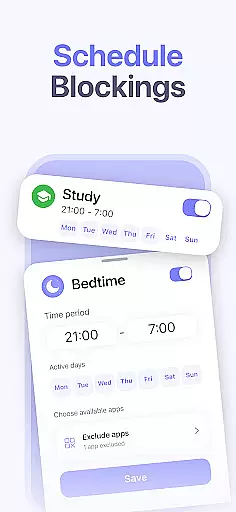
Kidsee stands out with its robust combination of features that cater to various aspects of digital parenting. One of its key strengths is the remote control functionality, which allows parents to instantly lock apps, set time limits, and even exclude educational apps from restrictions. This granular control helps establish healthy screen habits without compromising learning opportunities.
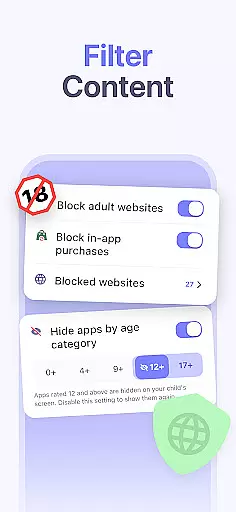
The app's GPS tracking capabilities are equally impressive, providing real-time location updates and historical data. Parents can also monitor their child's phone battery level to maintain constant connection. When it comes to online safety, Kidsee goes beyond basic content filtering by blocking adult websites, preventing in-app purchases, and allowing custom website restrictions.
What sets Kidsee apart is its scalability for larger families - supporting up to 10 child devices from a single parent account. The app's intuitive interface makes it easy to manage multiple children's devices across different platforms, including Android and iOS. This comprehensive feature set, combined with a user-friendly design, makes Kidsee a powerful tool for modern parents seeking to maintain balance in their children's digital lives.
When it comes to parenting apps, the credibility of content and expert validation are paramount. Kidsee Parental Control App ensures that all features are designed with the guidance of child psychologists and digital safety experts. This guarantees that the app not only helps in managing screen time but also promotes healthy digital habits among children.
The app's ability to block adult content and manage in-app purchases is developed based on extensive research into online safety for minors. By setting up robust filters and monitoring systems, Kidsee provides parents with tools that are both effective and reliable in protecting their children from inappropriate content and unwanted expenses.
Furthermore, Kidsee's approach to promoting digital wellbeing is backed by studies on child development and technology use. The customizable schedules and daily time limits are crafted to support a balanced lifestyle, ensuring that children can enjoy digital media without compromising their academic performance or physical health.
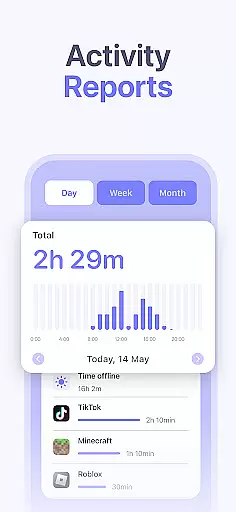
Growth tracking in parenting applications refers to the ability to monitor a child's development over time accurately. Kidsee offers precise tracking of app usage and screen time, allowing parents to understand their child's digital behavior patterns better. With detailed reports available by hour and day, caregivers can identify trends and make informed decisions about their child's tech use.
The GPS tracking feature in Kidsee is another aspect of growth tracking, providing real-time location data and historical movement records. This function is crucial for ensuring the safety of children, as it allows parents to verify their child's whereabouts and establish trusted zones where they are allowed to be.
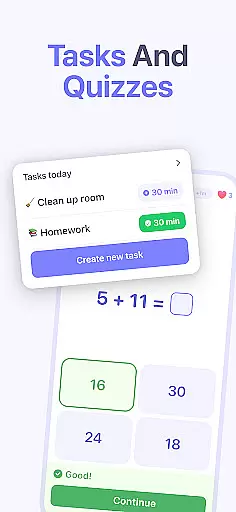
Moreover, Kidsee's capacity to exclude educational apps from restrictions highlights its commitment to supporting learning and development. By differentiating between entertainment and education, the app encourages the use of beneficial digital resources while limiting exposure to potentially harmful ones, thus contributing positively to a child's overall growth trajectory.
Comprehensive parental controls
Real-time GPS tracking
Cross-platform compatibility
Multi-child management
Easy remote access
Requires constant internet
Premium subscription needed
Complex setup process
Limited free trial period
Device permission requirements

Happiest Baby App replaces the SNOO App (the mobile companion to SNOO & SNOObie)
 3.20
3.20
Discover fun videos, kids songs, bedtime stories and games
3.60
Sleep better with white noise app! Discover rain sounds, fan noise and more.
4.70
Track your pregnancy, kick & contraction counter, baby & mom's heartrate monitor
4.60
Affirmations | Stories | Bible
4.10
Track pregnancy health and wellness with pregnant tracker from healthcare advice
4.3
Pregnancy+ App has helped 80m moms track their pregnancy with info & support!
4.80
All-In-One Pregnancy Tracker, Your Baby's Milestones, Growth Stages & Parenting.
4.90
The Most Trusted Co-Parenting App.
4.60
Track your labor contractions
4.90
FamilyAlbum helps you share, save, and remember your child's special moments.
4.80
SENSORYSOOTHE and SENSORSAFE: Making car seats smarter and families safer.
4.70
All-In-One Pregnancy Tracker, Your Baby's Milestones, Growth Stages & Parenting
4.70
With BabyCam you can monitor your baby using your mobile phone, tablet, PC or TV
4.40
Parental control: child monitoring app, screen time control, GPS child tracker
4.40
Comprehensive Parental Control & Child Safety — Hear & Protect Your Child World
4.30
Magic chalkboard coloring and drawing!
4.20
Family parental control app: limit screen time, block apps, GPS tracker.
4.20
AI Motion Video Maker & Ideas
4.0


User Reviews