
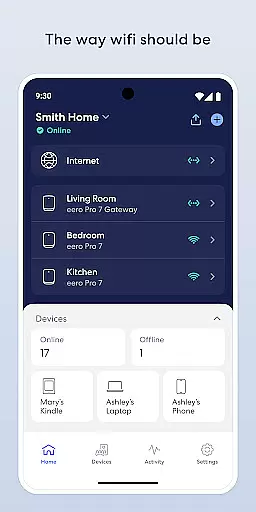
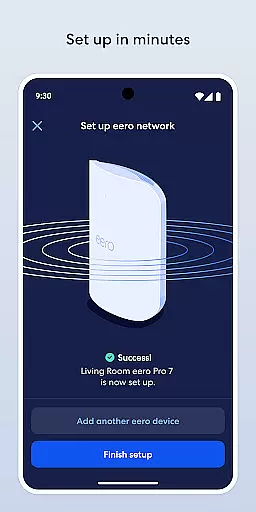
eero wifi system is a comprehensive home networking solution that provides fast and reliable internet coverage throughout your entire living space. The eero app serves as the control center for this innovative system, allowing users to easily set up and manage their network. With its intuitive interface, even non-technical users can complete the setup process within minutes.
The system automatically updates itself with new features, performance improvements, and enhanced security protocols. Users can remotely monitor and adjust their network settings, create guest networks, and implement parental controls. Advanced features like device blocking and internet scheduling make it an ideal choice for families who want to maintain a safe and controlled online environment.
The eero app offers several distinctive features that set it apart from traditional wifi management tools. Its automatic update system ensures that your network always operates with the latest security standards and performance enhancements. The remote management capability allows you to control your network from anywhere in the world through your mobile device.
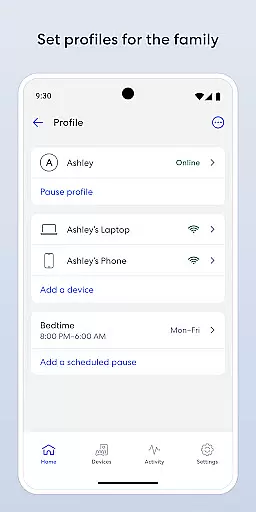
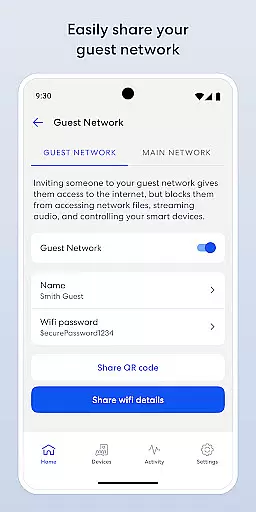
Parental controls are particularly robust, enabling you to schedule internet access times and pause connectivity when needed. The guest network feature creates secure temporary access for visitors without compromising your main network credentials. For enhanced protection, eero Plus subscription provides advanced security features including a password manager, antivirus software, and a VPN service powered by Guardian.
All these features work seamlessly together to create a smart home ecosystem where devices can communicate efficiently while maintaining optimal security levels. The system's scalability means it can grow with your needs, accommodating additional units to expand coverage area as required.
The eero app extends its functionality beyond just a basic Wi-Fi management tool by covering various aspects of modern lifestyle needs. With features like automatic updates, parental controls, and advanced security options, it ensures that users have everything they need to maintain a connected household.
One of the standout aspects is its ability to manage screen time and guest networks easily, making it ideal for families who want to control device usage and provide secure internet access to visitors. This broad range of functionalities places the eero app at the forefront of lifestyle management applications.
Additionally, the app offers eero Plus, a subscription service that includes a suite of online security solutions such as a password manager, antivirus software, and a VPN powered by Guardian. These features ensure that users not only enjoy seamless connectivity but also robust protection against online threats.
Authenticity and credibility are crucial for any application, and the eero app excels in these areas by providing reliable and expert-validated content. The app delivers frequent software updates that enhance performance and introduce new features, ensuring that users always have access to the latest advancements in Wi-Fi technology.
eero's collaboration with security experts and its inclusion of services like the Guardian-powered VPN underscore its commitment to offering credible and trustworthy solutions. Users can be confident that their network security is managed by professionals who prioritize privacy and safety.
Furthermore, the app encourages user feedback and engagement through direct support channels like support@eero.com. This approach not only helps improve the app continuously but also reinforces the trust users place in the eero brand, knowing that their input is valued and acted upon by the development team.
Easy setup process
Automatic security updates
Remote network management
Comprehensive parental controls
Expandable network coverage
Paid subscription for advanced features
Occasional connectivity issues
Limited customization options
Higher price point
Dependent on cloud services

Digital watch face design. Modern looking, hi-res & battery friendly.
 4.00
4.00
A daily quote for success
4.0
This app is intended to support professional EMDR therapy.
4.50
Your home in your hand
3.80
The Miracle Box includes methods used by Steve Huff of Huff Paranormal.
3.20
Wear your favorite memories, loved ones, pets or travel photos on your watch
4.4
The Wyze app is your gateway to a smarter life and a safer home.
4.40
Decorate your home screen with custom icons, color widgets, themes & wallpapers
4.70
Just play, earn rewards, fetch gift cards, and turn gaming into real payouts!
4.80
See wait times and check into a hair salon ahead of time with Online Check-In.
4.80
Smart & Healthy Living
4.60
Earn money & gift cards when you take surveys, play games, scan receipts & more.
4.50
PARAVOX 4 is a professional ITC paranormal research application.
4.50
What is my face shape? Find out your face shape from picture, see fitting frames
3.90
Easily manage your child's playtime, spending messaging and more.
3.50
Take Hobby Lobby with you wherever you go!
3.40
Designed to delight, impress and energize your festive spirit every single day
4.0
Bring the warm colors of fall directly to your wrist with Autumn Leaves!
4.3
The cutest Autumn watchface featuring the adorable Mr. Squirrel
4.1


User Reviews