
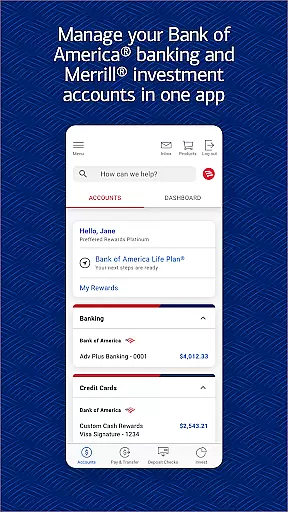
Bank of America Mobile Banking is a comprehensive financial management app designed for U.S.-based customers. The app allows users to conveniently and securely manage their checking, savings, credit card, loan, and investment accounts all in one place. With features like account balance monitoring, bill payments, Zelle® money transfers, and check deposits through mobile capture, it provides a complete banking experience on the go.
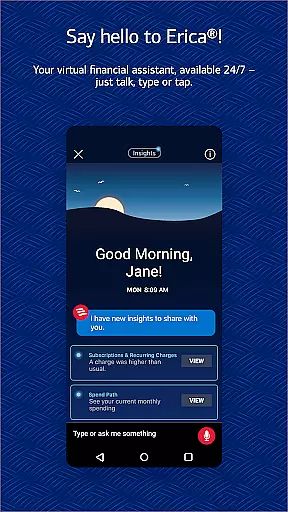
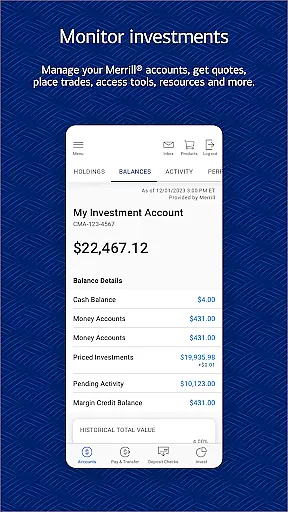
The app also includes Erica, a virtual financial assistant that helps users track transactions, pay bills, and receive personalized financial insights. Additionally, users can manage investments with Merrill, access FICO® Credit Scores, and utilize budgeting tools to organize spending by category. With advanced security features such as Touch ID® / Face ID®, fraud alerts, and secure messaging, Bank of America Mobile Banking ensures both convenience and protection for its users.
This app is particularly useful for individuals who need immediate access to their financial information while traveling or managing multiple accounts from different locations. Its robust functionality makes it an essential tool for modern banking needs.
Bank of America Mobile Banking offers a wide array of features tailored to enhance user experience. One standout feature is the ability to manage all types of accounts - including checking, savings, credit cards, loans, and investments - from a single interface. Users can view balances, review activities, activate or replace lost cards, set important alerts, and even deposit checks using their phone's camera. This level of integration simplifies personal finance management significantly.
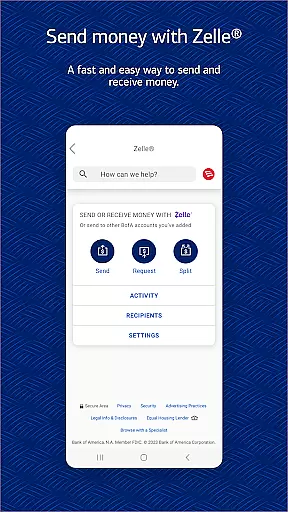
Another key feature is Zelle®, which enables users to send and receive money instantly using just a U.S. mobile number or email address. For investors, the app provides tools to trade stocks, ETFs, and mutual funds, along with real-time market data and news updates. Erica, the virtual assistant, adds another layer of utility by helping users find specific transactions, pay bills, and offer valuable financial insights. These innovative features not only save time but also empower users to make informed financial decisions.
Security is prioritized with options like Touch ID® / Face ID® login, instant fraud notifications, and a dedicated security center. Furthermore, the app offers educational resources and budgeting tools that help users maintain healthy financial habits. By combining these powerful features with an intuitive design, Bank of America Mobile Banking sets a high standard for digital banking applications.
Account and Fund Security is a critical feature of the Bank of America Mobile Banking app, ensuring that users can manage their finances with confidence. The app incorporates advanced security measures such as Touch ID and Face ID for biometric authentication, providing an additional layer of protection against unauthorized access.
The application actively monitors for any suspicious or potentially fraudulent activity related to your accounts. In the event that any irregularities are detected, you will be promptly notified so that appropriate action can be taken. This proactive approach helps safeguard your financial information and transactions.
Furthermore, the Mobile Banking Security Guarantee assures customers that they will not be held liable for unauthorized transactions if these are reported in a timely manner. By adhering to the security responsibilities outlined by the bank, users can enjoy peace of mind knowing their assets are protected under this policy.
With its comprehensive suite of security features, including a dedicated security center where users can review important information and settings, the Bank of America Mobile Banking app delivers robust protection for your funds and personal data.
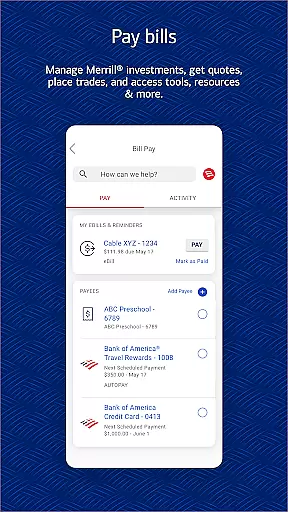
The Transaction Experience within the Bank of America Mobile Banking app is designed to offer users a seamless and efficient way to handle their financial activities. With capabilities ranging from transferring funds between accounts to paying bills directly through the app, it simplifies daily banking tasks significantly.
One standout feature is Zelleu00ae, which allows customers to send and receive money quickly using just a U.S. mobile number or email address. This service facilitates immediate transfers without needing to share sensitive account details, making peer-to-peer payments hassle-free.
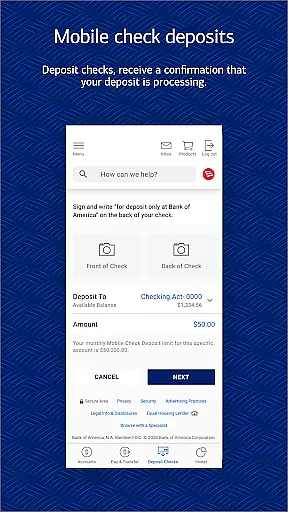
In addition, depositing checks has never been easier thanks to Check Deposit functionality. Users simply take photos of their checks, upload them via the app, and receive instant confirmation that processing has begunu2014eliminating trips to physical branches while maintaining high levels of convenience and speed.
Overall, these transactional tools empower users with greater control over their finances while delivering an intuitive interface that enhances usability across all aspects of mobile banking operations.
User-friendly interface
Comprehensive account management
Secure transactions
Instant money transfers
Virtual financial assistant
Limited international support
Occasional bugs
Requires internet connection
Some features have fees
Deposits not immediate

Expenses, Bills, Budget and Accounts - All seamlessly integrated in one app!
 3.80
3.80
Bank better with our new app
3.80
Earn cash & save money daily. Access instant cash advances* - no credit check!
4.50
PayMe helps you claim money from settlements on companies that harmed you.
4.80
Early payday & cash advances with no-fee mobile banking!
4.60
Simple & secure international money transfers - for personal & business needs.
4.80
BTC, Crypto, Stocks & Options.
4.20
Invest, bank & save in one app. Trade stocks, earn high APY & budget smarter.
4.00
Easy budgeting planning on a calendar!
4.80
Keep track of your subscriptions with no limitations
4.80
The Citi Mobile® App lets you manage your accounts virtually anytime, anywhere
4.80
Currency Converter (200+ currencies) with live exchange rates and offline mode.
4.70
Loan Calculator, Mortgage Calculator, Compound Interest Calculator
4.70
Over 180 currencies conversion rates with live exchange rates and offline mode.
4.60
Download the MySynchrony App to manage your accounts securely and conveniently!
4.60
Payday cash advance & Instant cash advance: Borrow money instantly, Get cash now
4.60
Earn cash back. Build credit.
4.60
Make Real Cash by Playing Games! Fetch Playful Rewards, Win & Triumph
4.50
Your insurance, anytime, anywhere
4.00


User Reviews