
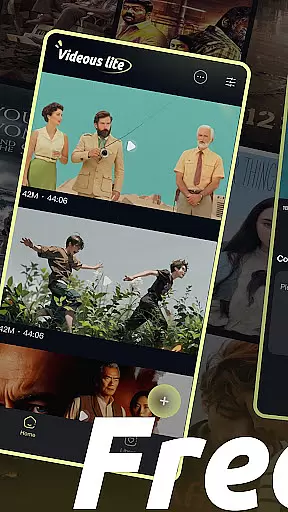
Videous lite is a streamlined video management and editing application tailored for users seeking efficient video processing. With its intuitive interface, the app allows users to easily organize, edit, and manage their video libraries. The home page presents a clear layout of the user's video collection, arranged chronologically with details like length and size for quick reference. Videous lite also offers practical features such as customizable settings, video tagging, and seamless navigation, making it suitable for both personal entertainment and professional use.
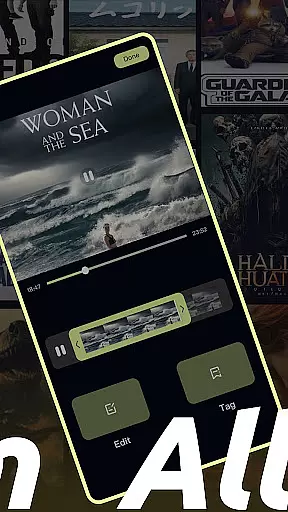
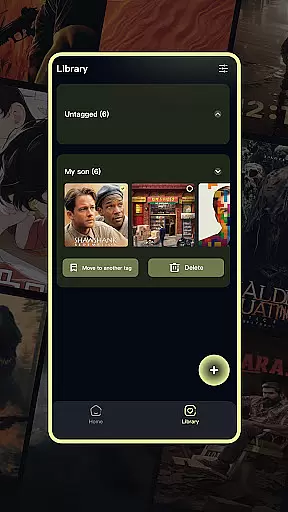
One standout feature is its simple yet powerful editing tool, which lets users trim videos accurately using a progress bar and categorize content through custom tags. Additionally, the app provides robust video management capabilities, including options to select, move, and delete files while keeping the library organized. Whether you're looking to enhance your creative projects or streamline your video workflow, Videous lite delivers an accessible solution that combines functionality with ease of use.
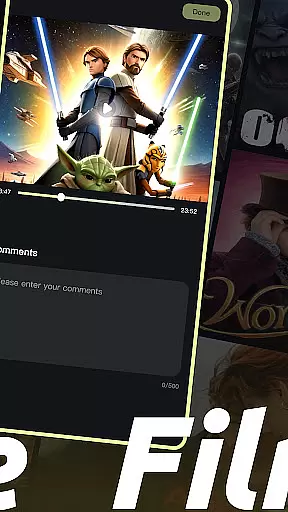
Videous lite stands out with its comprehensive set of features designed to simplify video management and editing. Upon opening the app, users are greeted by a well-organized home page displaying their video library in chronological order. Each video entry includes metadata such as duration and file size, enabling efficient organization. The app’s settings menu, accessible via the top-right corner, allows users to customize preferences, while additional administrative tools like comment viewing and bulk deletion can be found in the top-left corner.
The app excels in video uploads and edits. Users can quickly upload local videos using the prominent + button on the homepage, expanding their library effortlessly. For editing, Videous lite provides an intuitive drag-and-drop progress bar, empowering users to make precise cuts and create polished clips. Furthermore, the tagging system enhances video retrieval by letting users assign custom labels to their files. These features collectively ensure that managing and enhancing your video content has never been easier or more efficient.
In the realm of digital content, having a diverse and frequently updated library is essential. Videous lite-Made Easy offers users an extensive range of video management and editing capabilities that cater to both personal entertainment and professional creation needs. The application's intuitive interface allows for seamless navigation through a user's video library, which is neatly arranged in chronological order.
Each video is clearly marked with its length and size, making it easy for users to manage their collection efficiently. With the ability to quickly upload local videos using the + button on the homepage, Videous lite ensures that your video library remains fresh and up-to-date. This feature not only expands your repository but also keeps you engaged with new content regularly.
Beyond just storing videos, Videous lite provides practical functions such as tag customization, enabling users to categorize and retrieve their clips effectively. By offering these tools for organization and easy access, Videous lite supports continuous creativity and productivity. Users can thus maintain a dynamic video library that reflects their evolving interests and projects.
User engagement is a critical factor in the success of any entertainment application, and Videous lite-Made Easy excels in this area by providing features that encourage prolonged use. Its straightforward design includes a settings button for personalization, allowing users to tweak preferences to suit their unique workflows. This level of customization enhances user satisfaction and encourages longer sessions within the app.
The more button offers additional administrative options like viewing comments and deleting videos, which streamlines the management process. Such conveniences contribute to a smoother user experience, promoting retention as users find it easier to maintain an organized video library without leaving the app.
Moreover, Videous liteu2019s editing capabilities are designed to be intuitive yet powerful, letting users drag progress bars to make precise edits swiftly. These efficient editing tools not only save time but also empower users to create ideal clips that keep them coming back. As a result, Videous lite fosters both extended engagement durations and high retention rates among its users.
User-friendly interface
Efficient video tagging
Intuitive editing tools
Robust organizational features
Quick video uploads
Limited advanced editing
Few customization options
No cloud integration
Basic audio tools
Occasional lag

Simulation of Dashboard / Touch Screen for Tesla. (Works without actual Tesla).
 4.5
4.5
Stream Online TV - Watch Live IPTV Playlist & Channel with Built-In Player
4.50
Find out if you're on Santa's Naughty or Nice List with this magical scanner!
4.60
Real ghost box scanner with echo, reverb, EMF, & multi-stream channels.
3.80
Scan sets, track your builds, and enjoy intuitive digital instructions.
4.70
Earn gift cards for playing games. Become a real game tester!
4.40
Neon Christmas Tree Animated: Festive Wear OS watch face with fitness info
4.4
Binaural Brainwave Doses for Every Imaginable Mood
3.60
Connect. Discover. Control.
3.60
The OFFICIAL PeeWee Purpdrank Soundboard!
4.80
Pathfinder 2e initiative tracker with bestiary, HP, reaction, conditions, etc
4.80
Wodfix Air aggregates popular online content for you.
4.80
Companion app for Elden Ring to track quests, bosses, progress and more.
4.70
Watch short films, dramas, reels, series and movies anytime on Micro Drama.
4.60
Your Avatar, Endless Fun
4.60
Fool your friends & Family with Fake ultrasound test report
3.60
Unofficial Game Companion App” “Guides • Builds • Tips • Progression
4.0
Journey to the world’s oldest rainforest and meet its Indigenous Custodians.
4.5
Christmas Globe: Transform your Wear OS device into a festive timekeeper!
4.0


User Reviews