

T-Life is a comprehensive lifestyle app designed to enhance the digital experience of T-Mobile users. This versatile application serves as an all-in-one platform for managing mobile services, accessing exclusive benefits, and exploring new opportunities. Users can conveniently handle account-related tasks, discover special offers, and engage with unique features that add value to their T-Mobile subscription.
The app's core functionality revolves around simplifying everyday mobile interactions while providing access to premium content and services. Whether it's upgrading devices, monitoring usage, or exploring entertainment perks, T-Life streamlines these processes through an intuitive mobile interface. The application particularly shines in its ability to consolidate multiple service touchpoints into a single, user-friendly environment.
For individuals seeking to maximize their T-Mobile benefits, T-Life offers a gateway to exclusive offers including streaming services and financial tools. The app's integration with various T-Mobile services creates a seamless ecosystem where customers can manage their digital life while enjoying additional value-added benefits, making it an essential tool for both new and existing subscribers.
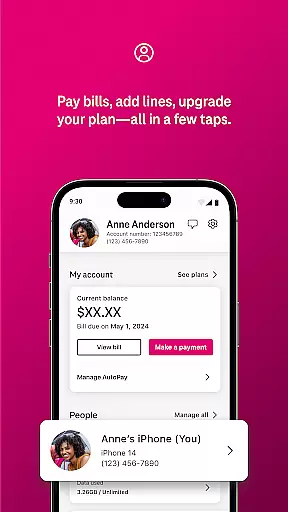
T-Life distinguishes itself through a rich set of features designed to enhance the mobile customer experience. The application's most notable capability is its comprehensive account management system, allowing users to perform essential tasks such as bill payments, plan modifications, and usage tracking with remarkable ease. This feature alone transforms how customers interact with their service provider on a daily basis.
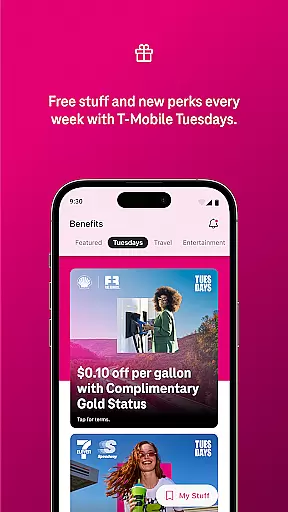
Another significant aspect is the app's integration with exclusive T-Mobile benefits and promotions. Users can access special offers like Netflix On Us, participate in the T-Mobile Tuesday rewards program, and explore various savings opportunities across different categories. The inclusion of security features like Scam Shield demonstrates the app's commitment to protecting users from unwanted communications and potential threats.
What sets T-Life apart is its ability to cater to diverse customer needs through specialized tools. From configuring home internet gateways to managing financial accounts through T-Mobile MONEY® services, the application provides specialized interfaces for different aspects of digital life management. These features are implemented with careful attention to user experience, ensuring that even complex tasks can be completed efficiently through the mobile application.
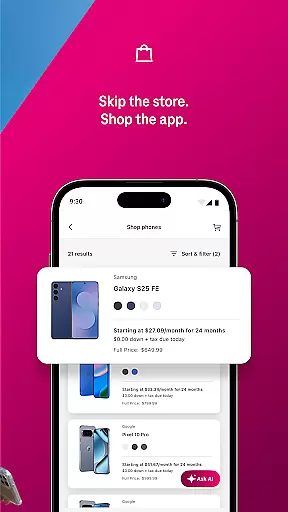
T-Life offers an extensive range of services and features that cater to various aspects of everyday life, ensuring users have everything they need in one place. The app provides functionalities from shopping for new devices, managing personal accounts, accessing exclusive benefits, to configuring home internet gateways.
With sections dedicated to entertainment, finance, connectivity, and device management, T-Life ensures comprehensive coverage of lifestyle categories. Whether it's about getting savings on travel and dining or protecting oneself from spam and robocalls with Scam Shield, the app has been designed to enhance user convenience and security.
Users can also explore rate plans, shop for devices, and even switch to T-Mobile directly through the app. This wide array of services makes certain that there is something for everyone, addressing multiple facets of a connected lifestyle.
The content available within T-Life is curated to ensure authenticity and credibility, providing users with reliable information and benefits. Exclusive offers such as Netflix On Us and participation in events like T-Mobile Tuesday are well-documented and verified, offering tangible value to the users.
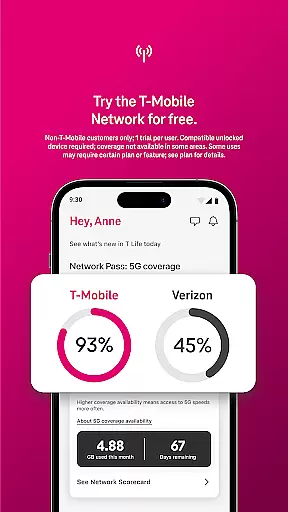
Moreover, the app gives access to expert-validated services like Americau2019s Best Network trial, which is based on analysis by Ooklau00ae of Speedtest Intelligenceu00ae data. Such validations reinforce the trustworthiness of the offerings within the app.
Financial services including T-Mobile MONEYu00ae and T-Life VISAu00ae accounts further underline the commitment to credible and essential lifestyle solutions, making sure users have access to vetted and valuable content.
User-friendly interface
Comprehensive account management
Exclusive benefits access
Robust security features
Integrated rewards system
Limited to T-Mobile customers
Occasional connectivity issues
Device compatibility restrictions
Some features require subscription
Learning curve for new users

Chat, meet genuine singles in your area. Real connections start with being real.
 4.30
4.30
The all-new Cync app. The simple, connected app for Cync and C by GE.
4.50
BILT interactive 3D instructions help you get the job done right
3.50
Discover the "To Be a Christian" App: Your Guide to Deepening Faith!
5.00
Your home in your hand
3.80
Make money, get paid cash rewards & gift cards for every survey. Earn today!
4.60
A smart Siddur with halachic times
4.50
Simple, stylish & fresh watch face. Customize colors, gradients & complications.
4.70
Just play, earn rewards, fetch gift cards, and turn gaming into real payouts!
4.80
Countdown to Christmas 2025 with festive games & activities in a virtual village
4.80
Good magnifier app to see tiny things bigger and more clearly!
4.80
Retro animated weather with hourly forecast Watch Face for Wear OS
4.60
Share opinions, get paid cash
4.30
Spirit Communicator is a real paranormal ghost hunting app with many fun modes.
3.90
Design and brew great homebrewing beer, mead, cider and wine recipes on the go!
3.60
Unique informative Dial with Live Moon Phase at a glance!
3.60
Going above and beyond known spirit communication
3.60
View over 160,000 line dance stepsheets from the CopperKnob website.
3.30
Falling Fruit is a massive collaborative map of food in our cities.
3.20


User Reviews