
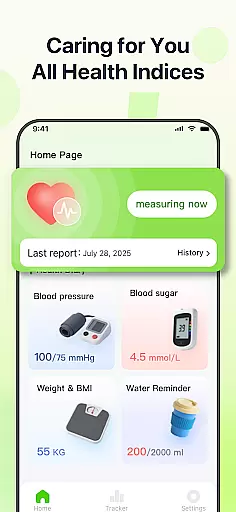
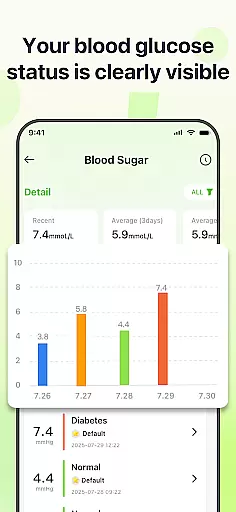
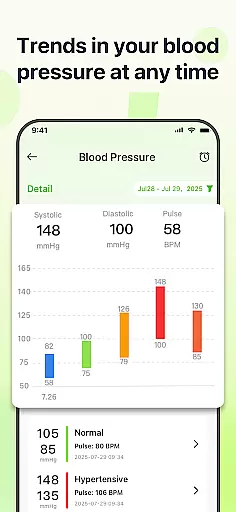
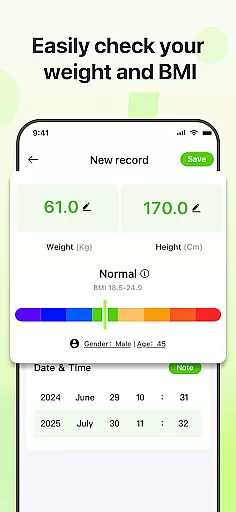
PulseSense is a comprehensive health tracking application designed to simplify wellness management. It allows users to effortlessly log key metrics such as blood pressure, glucose levels, and heart rate while providing intelligent reports tailored to personal data. With sleek trend visualizations spanning days to years, the app helps uncover patterns and track progress over time.
Designed for individuals managing chronic conditions, pursuing fitness goals, or seeking a private health journal, PulseSense ensures complete data privacy through end-to-end encryption without requiring cloud storage or account creation. Its reminders and consolidated logging make it an indispensable tool for maintaining healthy habits.
PulseSense stands out with its effortless logging system, enabling users to input critical health metrics like blood pressure, glucose levels, and heart rate seamlessly. The app's intelligent reporting feature generates personalized lifestyle recommendations based on logged data, empowering users with actionable insights rather than just raw numbers.
Its standout functionality includes sleek trend visualizations that span multiple timeframes—days, weeks, months, and years—allowing users to identify long-term patterns. Additionally, the app supports custom notes and tags for contextual entries, ensuring every record is meaningful. Privacy remains paramount, with all data encrypted locally on the device, free from cloud uploads or third-party sharing.
Personalized planning in health applications refers to the ability to tailor health goals and strategies based on individual user data. PulseSense excels in this area by offering intelligent health reports and personalized lifestyle recommendations. The app analyzes logged metrics such as blood pressure, glucose levels, and heart rate to generate actionable insights unique to each user's wellness journey.
The implementation of personalized planning within PulseSense includes sleek trend visuals that span days, weeks, months, and years. These visuals help users uncover patterns and track progress over time. Additionally, users can attach personal notes and custom tags to their entries, providing further context to their health data and enabling more precise personalization.
Users benefit from PulseSense's personalized planning through improved health management and goal setting. By consolidating all health metrics in one place, individuals can set reminders to reinforce healthy habits and gain insights beyond raw numbers. This empowers users to make informed decisions about their health, ultimately leading to better outcomes and a more proactive approach to wellness.
Progress visualization is a critical feature in health apps, allowing users to see their advancements and stay motivated. PulseSense offers robust visualization tools that display health trends over various timeframesu2014days, weeks, months, and years. This functionality helps users monitor their metrics like blood pressure, glucose levels, and heart rate with ease and clarity.
The app achieves effective progress visualization through intelligent graphical representations. Users can view sleek trend visuals that make it simple to identify improvements or areas needing attention. Furthermore, PulseSense provides comprehensive health reports that offer deeper insights into the visualized data, ensuring users understand the full picture of their health status.
With PulseSense's progress visualization, users experience enhanced engagement and consistency in managing their health. The ability to visually track changes and achievements fosters a sense of accomplishment and encourages continued adherence to health goals. Ultimately, this feature not only informs users but also inspires them to maintain and improve their health routines, making their wellness journey more rewarding and effective.
User-friendly interface
Advanced trend analysis
Personalized health insights
Strong data encryption
No cloud dependency
No direct measurement tools
Limited medical guidance
Premium features may cost extra
Requires manual data entry
Not ideal for real-time alerts

Easy access to health benefits
 4.70
4.70
Your plan in your pocket 24/7
3.00
For Absolute Novices to Strength Training. Simple. Effective.
4.40
Easy reconstitution calc for mixing peptides and creating protocols
4.70
HRV4Training helps you optimize goals and improve performance. No sensors needed
3.30
Get alert about getting out of desired heart rate zone.
4.10
A brain game that moves you
4.70
Your Health Assistant
3.90
Monitor blood sugar, gain insights, and manage diabetes with ease.
3.20
sobriety counter app to help and motivate people to stop drinking alcohol.
4.90
Get lasting results with Chair Yoga, Wall Pilates, and Walking workouts!
4.60
FODMAP, Gluten, Allergy, Vegan
4.50
Raccoon AI Calorie Counter. Intermittent Fasting & Timer. Macro, Carb, Protein
4.50
Interval timer for High Intensity Interval Training, Tabata and Circuit Training
4.20
Your personal BP tracking companion, focus on helping you achieve wellness goal.
4.10
SportWerks - Workout Tracker for Wear OS Watches
3.90
Understand your body’s most meaningful messages and transform your health.
3.90
3D Body Measurement System
3.60
Measure real-time wrist & ambient temperature with your Galaxy Watch (Wear OS)
3.20


User Reviews