
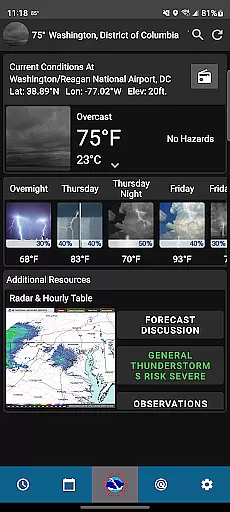
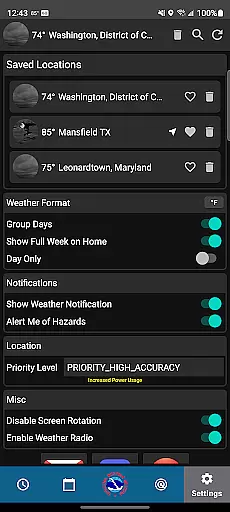
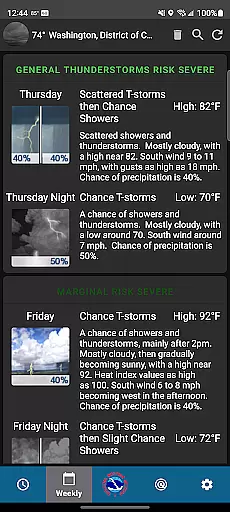
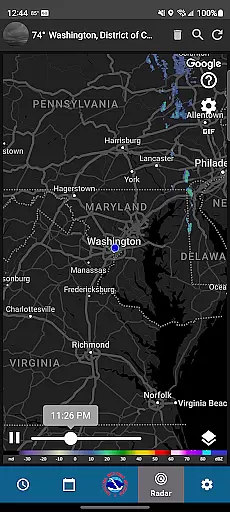
NWS Weather is a premier weather forecasting application developed by the National Weather Service. This app provides users with highly accurate and detailed weather information, including hourly forecasts, current conditions, and week-long predictions. The app stands out through its scientific approach to weather forecasting, offering features such as radar technology for storm tracking and customizable settings for location preferences.
With real-time weather alerts, widgets for quick updates, and an active weather notification system, NWS Weather ensures that users are always informed about changing weather patterns. Whether planning daily activities or preparing for severe weather conditions, this app equips users with reliable meteorological data to make informed decisions.
The true value of NWS Weather lies in its educational aspect. Through the forecast discussion feature, users can gain deeper insights into the science behind each prediction. This makes the app not only a practical tool but also an educational resource for those interested in meteorology.
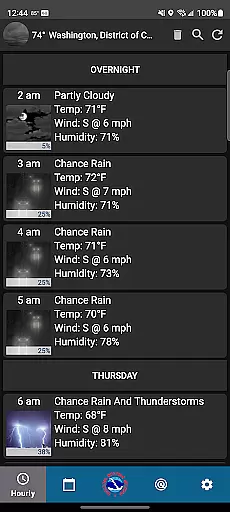
NWS Weather offers an impressive array of features designed to provide comprehensive weather information. One of its standout capabilities is the hourly forecast function, which delivers meticulously detailed predictions for each part of the day. This feature is supported by the National Weather Service's extensive data network, ensuring accuracy and reliability.
In addition to hourly forecasts, the app provides real-time weather updates and a week-long forecast option. Users can track temperature fluctuations, wind patterns, and precipitation trends through the app's advanced radar technology. This allows for better preparation against potential weather hazards. The customization options further enhance user experience, allowing individuals to tailor the app to their specific needs.
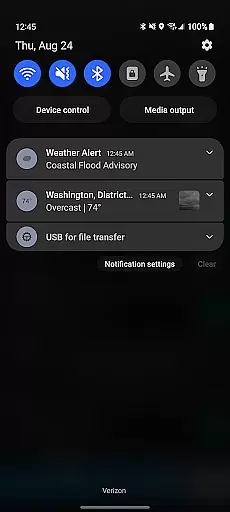
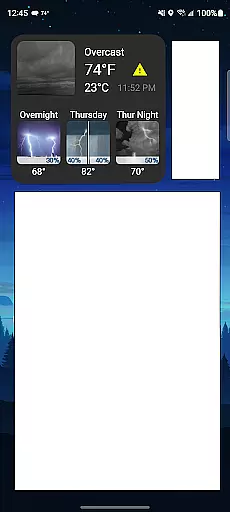
Another key feature is the real-time weather alert system, which notifies users of severe weather conditions. Combined with convenient home screen widgets and an active weather notification system, NWS Weather ensures that users have constant access to critical weather updates. The forecast discussion feature adds an educational layer, providing insights into the meteorologists' decision-making processes.
Forecast accuracy and data credibility form the backbone of any reliable weather application. The NWS Weather app excels in this area by providing forecasts that are not only timely but deeply rooted in scientific meteorological principles. This ensures users receive predictions that are consistently dependable.
The app leverages the National Weather Service's advanced modeling techniques and vast network of weather stations to deliver precise hourly, daily, and weekly forecasts. By tapping into a wealth of historical and real-time data, it offers insights that help users plan their activities with confidence, knowing they can trust the information provided.
Moreover, the inclusion of radar technology and forecast discussions allows users to understand the rationale behind each prediction. This transparency not only enhances trust but also educates users on the complexities of weather forecasting. As a result, individuals can make informed decisions based on credible data tailored to their specific locations.
Understanding both temporal and spatial forecast ranges is crucial for effective planning and decision-making. The NWS Weather app addresses these needs by offering extensive coverage across different timeframes and geographic areas. Users gain access to detailed short-term forecasts as well as extended outlooks spanning several days.
With its robust GPS tracking feature, the app provides localized forecasts that adapt to a user's current location. Whether you're at home or traveling, you'll receive accurate updates relevant to your surroundings. Additionally, customizable settings allow for personalized alerts based on specific thresholds or conditions important to individual users.
This comprehensive approach ensures that no matter where you are or what your schedule looks like, the NWS Weather app has you covered. From immediate weather changes to long-term trends, the app equips users with all necessary tools to stay prepared and ahead of any potential weather disruptions.
Accurate Forecasts
Real-Time Alerts
Customizable Settings
Educational Insights
Reliable Data Source
Complex Interface
Limited Social Sharing
No Offline Mode
Heavy on Battery
Frequent Notifications

Accurate weather forecast and beautiful weather & clock widgets
 4.20
4.20
Get the ad-free version of the highly rated WeatherBug app for accurate weather!
4.50
Personal Weather Station PRO - Meteo monitor to check your WU info and charts.
4.20
Your ultimate app for accurate local weather information!
4.60
The moon phases app for tracking the lunar calendar, blue moon and full moon.
4.80
Accurate, beautiful weather with landscapes depicting weather, sky, season.
4.50
Download now and give your smartwatch a fresh, premium look!
4.20
Analog Weather Watch Face for Wear OS 5+
4.10
Weather watch face for Wear OS 5+
4.10
Weather - Local weather forecast, weather daily & hourly, weather radar
4.80
NOAA forecast & radar for your exact location.
4.80
Ultimate weather forecast + moon phase for Wear OS 5+ (Pixel, Galaxy, et al.)
4.70
The reliable and trusted global air quality, wildfire, pollen, PM2.5 forecast
4.70
Powerful US and worldwide earthquake feed with earthquake alerts and maps.
4.60
72-hour weather & daily forecasts with extreme weather alerts
4.60
14-day & 24-hour Forecast | Real-time Alert | Accurate & Fast
4.40
Stay ahead of the weather with Daily Weather
4.10
A powerful weather forecast to get real-time weather information
3.60
Detailed weather info and moon phase, subtle animation, customizable
4.0


User Reviews