
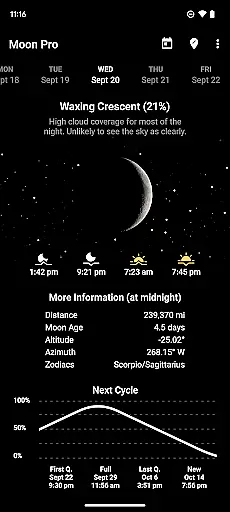
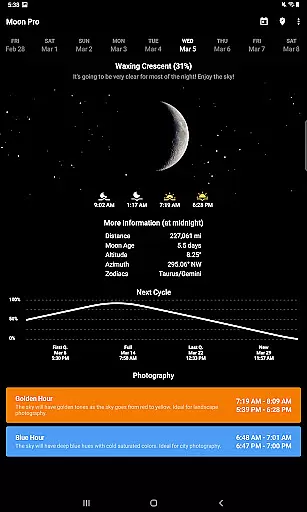
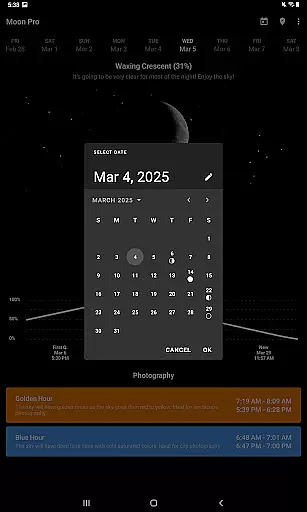
My Moon Phase Pro is a premium weather application designed for tracking the lunar calendar with precision and style. The app features a sleek dark design that enhances visibility of critical moon data, including current moon phases, moonrise and moonset times, and predictions for upcoming astronomical events like the next full moon. Its intuitive interface allows users to effortlessly scroll through dates or tap on specific days to view detailed moon phase information.
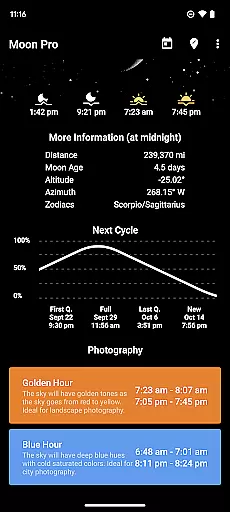
Beyond basic tracking, the app provides valuable tools for moon photography enthusiasts. It displays golden hour and blue hour times, helping users capture stunning lunar images. With location-based functionality, users can either enable automatic location detection or manually select their preferred location. This ensures accurate local moon data, cloud coverage forecasts, and precise timing of key moon phases such as new moon, first quarter, and last quarter.
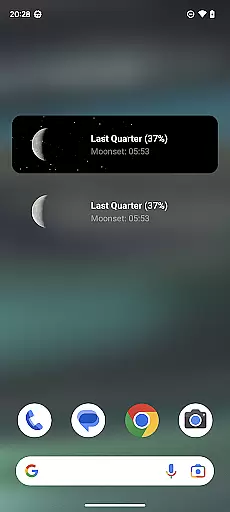
The Pro version offers an ad-free experience with additional benefits like home screen widgets and customizable notifications for specific moon phases. Whether you're an amateur astronomer, photographer, or simply someone interested in celestial patterns, My Moon Phase Pro delivers comprehensive lunar insights tailored to your needs.
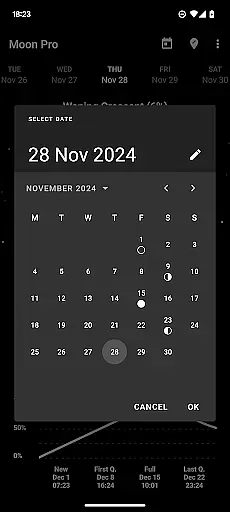
My Moon Phase Pro stands out with its rich feature set tailored for lunar enthusiasts. One of its core strengths is the ability to view the moon cycle for any future date by simply scrolling on the date bar or using the calendar button. This flexibility makes it easy to plan ahead for important astronomical events or photography sessions. Additionally, the app supports both automatic location detection and manual location selection, ensuring users receive accurate data regardless of their location preferences.
For photographers, the app provides golden hour and blue hour times, enabling optimal planning for capturing breathtaking moon photos. It also includes advanced details such as the moon's distance from Earth, its age, and current altitude, all available for any selected date. Users can stay informed about upcoming moon phases directly from the main screen, which displays clear indicators for the next full moon, new moon, first quarter, and last quarter.
Another standout feature is the notification system, which alerts users when the moon reaches a specific phase of their choice. The Pro version enhances this experience further by offering an ad-free interface and home screen widgets for quick access to essential moon data. These thoughtful features make My Moon Phase Pro an indispensable tool for anyone seeking detailed and reliable lunar information.
My Moon Phase Pro excels in providing precise lunar forecasts and credible data. The app meticulously tracks the moon's phases, offering exact times for moonrise and moonset, as well as predicting the next full moon with accuracy.
Users can scroll through the date bar or tap the calendar button to view the moon cycle for any future date. This feature ensures that whether you are an amateur astronomer or a professional photographer, the information you receive is both reliable and timely.
The app allows manual location selection or uses your current GPS location to provide localized lunar information. By checking cloud coverage predictions, users can determine the visibility of the moon, enhancing the reliability of the forecast.
With notifications and alerts for specific moon phases, My Moon Phase Pro keeps you informed about significant celestial events. This functionality not only aids in planning observations but also enriches your understanding of lunar patterns.
One of the standout features of My Moon Phase Pro is its extensive temporal and spatial forecast range. The app provides detailed lunar phase schedules, ensuring users have access to comprehensive moon phase data across different locations and time periods.
By allowing users to select any date in the future, the app offers an expansive view of upcoming moon phases. This includes critical information such as the next full moon, new moon, first quarter, and last quarter, all visible directly on the main screen.
For those interested in moon photography, the app includes golden hour and blue hour times. These specific details help photographers calculate the optimal moments for capturing stunning lunar images, regardless of their location.
Additionally, more granular data like the moon's distance from Earth, its age, and current altitude are available for any date. This level of detail supports both casual interest and serious scientific inquiry, making My Moon Phase Pro an invaluable tool for anyone engaged with lunar phenomena.
User-friendly interface
Accurate moon phase data
Golden hour and blue hour info
Customizable notifications
Ad-free experience
Paid pro version
Limited free features
No offline mode
Requires location access
Widgets need pro upgrade

Get instant weather & temperature predictions right on your Wear OS smartwatch!
 4.3
4.3
An unofficial app version of the National Weather Service (Weather.gov)
3.90
Get accurate rainfall and snowfall totals for pinpoint locations on a map.
4.60
Quickly check the Hanalei river gauge height during heavy rains on Kaua'i.
4.1
Road weather, live radar, wind, snow, and conditions along your driving route.
4.70
No ads, No data collected. Beautiful and powerfully customizable weather app
4.90
Storm Radar, Alerts & Live Weather Forecasts Right on Your Home Screen
3.70
Industry leading whitetail movement predictor & hunting app.
4.60
NOAA forecast & radar for your exact location.
4.80
Weather radar, hyperlocal tracker and weather maps: follow your weather station
4.80
Your ultimate app for accurate local weather information!
4.60
Prepare for severe weather with notifications, future radar, and live alerts.
4.60
Accurate Thermometer: indoor & outdoor temperature, humidity, pressure, and wind
4.50
Accurate, beautiful weather with landscapes depicting weather, sky, season.
4.50
Room Temperature Thermometer meter shows indoor, outdoor temperature, humidity.
4.40
Precision Weather, Right at Your Fingertips
4.40
Local weather forecast, reliable daily weather report
4.30
Weather watch face for Wear OS 5+
4.10
Dynamic weather watch face with glass effect, bold time & 7 complications.
4.3


User Reviews