
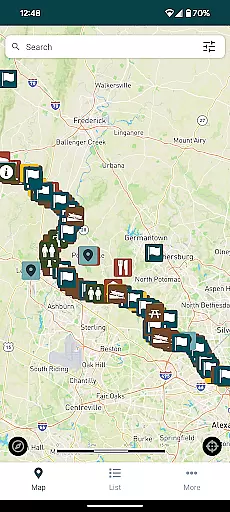
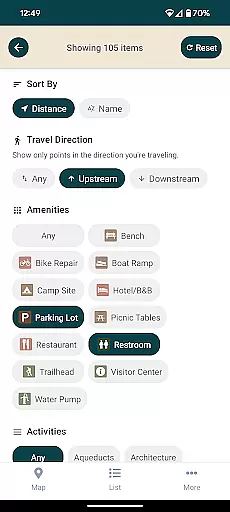
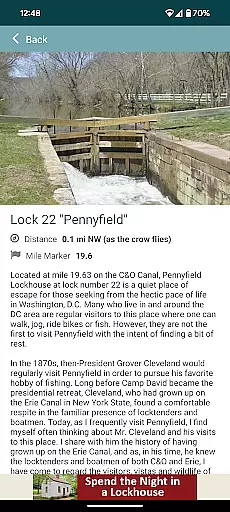
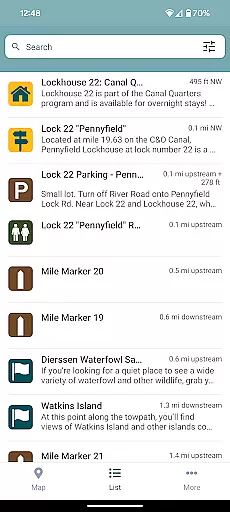
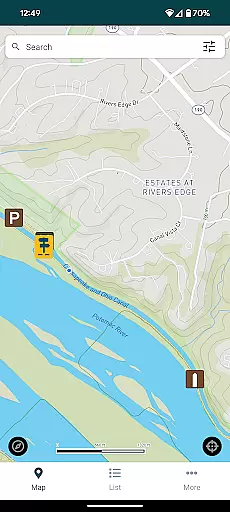
C&O Canal Explorer is a comprehensive navigation app designed specifically for exploring the entire 184.5-mile stretch of the C&O Canal National Historical Park. The app serves as your personal guide, providing detailed mapping and information on over 800 points of interest within the park.
Key features include an extensive searchable database that allows users to easily locate hiking trails, campgrounds, historical sites, trailheads, parking areas, and other essential amenities. The app also incorporates a smart distance calculator, showing users how far they are from nearby points of interest, enhancing their exploration experience.
Whether you're a casual visitor or a dedicated outdoor enthusiast, this app is invaluable for anyone looking to fully experience and navigate the diverse landscapes and rich history of the C&O Canal National Historical Park.
The C&O Canal Explorer stands out with its meticulously curated collection of over 800 points of interest, each carefully mapped and categorized for ease of use. Users can search through various categories such as hiking trails, campgrounds, historical landmarks, and more, all presented in an intuitive format.
A unique feature of the app is its built-in distance calculator, which dynamically computes the distance between the user's current location and nearby amenities or points of interest. This functionality not only aids in planning but also enhances real-time navigation within the park.
Additionally, the app encourages users to explore new paths and areas of the park they may not have considered before, enriching their overall experience and understanding of the C&O Canal National Historical Park's vast offerings.
Map accuracy is essential for any navigation app, and the C&O Canal Explorer excels in this area. The app provides precise mapping of over 800 points of interest along the 184.5 miles of the C&O Canal National Historical Park.
Each location, including hiking trails, campgrounds, historical sites, and trailheads, has been carefully plotted to ensure users can rely on the information provided. This meticulous attention to detail ensures that adventurers can confidently explore new paths within the park without worrying about inaccurate directions.
The app also calculates distances from your current location to nearby amenities and points of interest. This feature not only enhances user experience by providing real-time proximity data but also ensures that visitors can plan their journeys effectively.
Route planning is a core functionality of the C&O Canal Explorer app, designed to enhance your exploratory experience within the C&O Canal National Historical Park. The app offers multiple route options based on various points of interest, ensuring you can tailor your journey according to your preferences.
Users can select different types of routes, whether they are interested in historical landmarks, natural beauty, or recreational activities like hiking and camping. The app's intelligent system considers these preferences while suggesting optimal paths, making each trip unique and personalized.
In addition to customizable routes, the app provides real-time updates on trail conditions and potential closures. This ensures that users have the most up-to-date information at their fingertips, allowing them to make informed decisions about their travel plans.
User-friendly interface
Comprehensive point database
Smart distance calculator
Encourages exploration
Historical site info
Limited to one park
No offline maps
Occasional bugs
GPS accuracy issues
Heavy on battery

The fastest and most convenient way to pay for parking on our lots.
 4.40
4.40
Navigate with your watch and keep the phone in your pocket!
4.60
TACNAV-X: Precision MGRS navigation, built specifically for the military.
4.00
Affordable rides and food delivery with incredible discounts in just one app.
4.50
Explore with GPS Navigation with GPS offline, voice GPS, speed camera radar
4.60
Use GPS Maps and GPS Voice Navigation to find your way and get directions
4.10
GPS phone tracker, family locator, secure location sharing app
4.20
Navigate MTA, NJ Transit, MBTA, SEPTA, BART, MARTA, CTA & 900+ cities
4.60
Rideshare, taxi cabs, and more for your airport travels and everyday trips.
4.50
LIRR and Metro-North tickets and trips
4.80
GPS Speedometer & Odometer: Track car, bike, truck speed & distance in real-time
4.70
Find trails, organize your locations and navigate with offline maps.
4.60
Track friends in real-time and explore worldwide live cameras.
4.60
"Balad" is a map and navigator with a Persian voice assistant and a complete city guide
4.40
Avoid delays. Get real-time GPS navigation, safety alerts and live traffic.
4.10
Navigation, weather, offline maps & tools for smarter, safer travel planning.
4.00
Explore Live Earth Map with 3D World Map & locate cites, mountains real time.
3.80
Your guide to the recreational opportunities of the Bureau of Land Management!
3.40
Your real-time window to the world. Explore anywhere, anytime.
3.30


User Reviews