
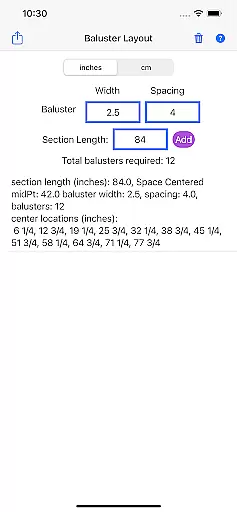
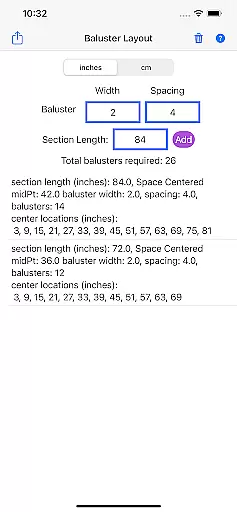
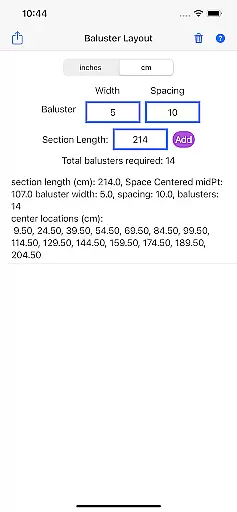
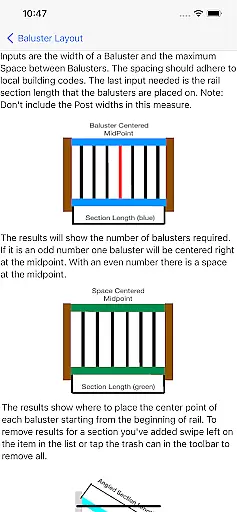
Baluster Layout is a specialized application designed for deck and stair builders who need precise baluster spacing calculations. The app's core functionality lies in its ability to quickly determine the exact number of balusters required and their optimal placement to meet building code standards. Users simply input the railing length, baluster width, and desired spacing, and the app performs all necessary calculations.
What sets Baluster Layout apart is its adaptability to various project requirements. It can handle complex projects with multiple railing sections, each having unique dimensions. Additionally, users have the flexibility to choose between inches or centimeters, making it suitable for both imperial and metric systems. Whether you're a professional builder or a DIY enthusiast, this app ensures your structures are not only visually appealing but also code-compliant.
The app proves particularly useful when working on large-scale projects where precision and compliance are crucial. By automating the calculation process, it saves time and reduces the risk of human error, ensuring that every baluster is placed accurately and according to safety regulations.
Baluster Layout offers several notable features that enhance its usability and effectiveness. First and foremost is its precision spacing capability, which calculates the optimal distance between balusters to ensure full compliance with building codes. This feature alone can save users significant time and effort by eliminating manual calculations.
Another key aspect is its support for multiple rail sections. This allows users to manage complex projects with different railing dimensions easily. Each section can be configured independently, providing detailed results on the number of balusters needed and their exact placement. The app also offers unit flexibility, supporting both inches and centimeters, catering to a global audience with varying measurement preferences.
Finally, the app provides comprehensive breakdowns of each project, detailing the number of balusters required per section and their precise locations. This level of detail helps users avoid costly mistakes and ensures that their structures are both safe and visually appealing. These features collectively make Baluster Layout an indispensable tool for anyone involved in baluster installation projects.
When it comes to planning and executing a building project, having accurate information is crucial. Baluster Layout provides precise data tailored specifically for deck and stair builders. The app calculates baluster spacing with exact measurements, ensuring that all figures comply with current building codes.
The application's algorithms are designed to process multiple variables including railing length, baluster width, and desired spacing. This ensures that the final layout presented to users reflects real-world requirements. By offering detailed results for each section of a project, the app gives builders confidence in the accuracy of their plans.
Users benefit from the peace of mind that comes with knowing their baluster installations will meet safety standards. With features like unit flexibility and comprehensive breakdowns, Baluster Layout eliminates guesswork and potential errors. This leads to structures that are not only visually appealing but also structurally sound.
Beyond simple calculations, Baluster Layout offers functionalities that assist in managing complex building projects. One key feature is its ability to handle multiple rail sections, each with unique dimensions. This allows users to input different parameters for various parts of a structure, streamlining the management of diverse project requirements.
The appu2019s interface is designed for ease of use, providing clear options for selecting measurement units and entering project specifications. Its detailed results include the number of balusters needed for each section and their exact placement, which simplifies inventory management and work scheduling. These capabilities help both professionals and DIY enthusiasts organize their tasks more effectively.
By integrating these home management features, Baluster Layout saves time and reduces hassle. Builders can avoid costly mistakes while ensuring compliance with building codes. Ultimately, this tool transforms what could be a complicated process into a manageable and efficient workflow.
Time-saving
Code-compliant
Unit flexibility
Detailed results
User-friendly
Limited to balusters
No 3D visualization
Basic interface
Requires manual input
No offline mode

For all of your Airthings devices
 4.30
4.30
This Fire TV Remote control's your Fire TV Device and Insignia Fire TV Remote
3.70
Parcel Pending Resident App
4.50
AI floor creator to design your dream house, plan rooms & style your home
4.00
Schlage Lock Company LLC
4.00
Real estate app to find homes for sale or rent in the right neighborhood for you
4.70
Plan your remodel AI home renovation easily using planner 5D and home decor AI.
4.40
WiZ smart light system
4.40
Turn old phones into security cameras, baby monitors, pet cams, and more.
4.70
View houses and apartments for rent, updated daily.
4.80
Find your next home, house, apartment, condo, casa, flat, rental, studio, or bed
4.70
Your guide to apartments & rental homes. Find your next place to rent with AG.
4.60
AI-powered home design, interior design, home decor, and room design solutions
4.50
SmartRent - Opening Doors To A Smarter World
4.40
3D House Design and AI Room Planner - from floor plans to full interior design.
4.40
Fully control your Philips TV with this all-in-one remote control app.
4.20
Design your dream home with 3D planning app, Visualize your dream home in 3D.
4.20
Universal Tv Remote Control for all Tv. Cast for chromecast & all Tv Controller
4.20
Our app allows Sunrun customers to monitor systems, pay bills, and get support.
3.80


User Reviews