



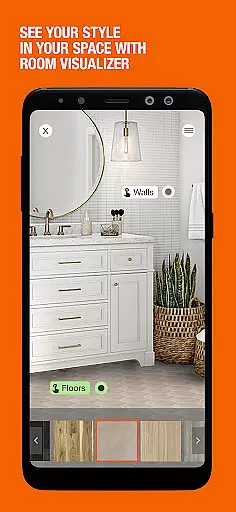

The Home Depot app is a comprehensive shopping tool designed specifically for home improvement enthusiasts. With over one million products available, this application allows users to efficiently search and shop for all their DIY needs. The app's standout feature is its Image Search functionality, which enables users to snap a picture of any item and find similar products within the app.
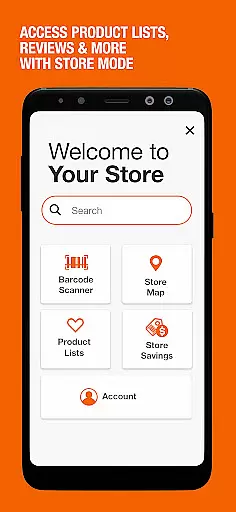
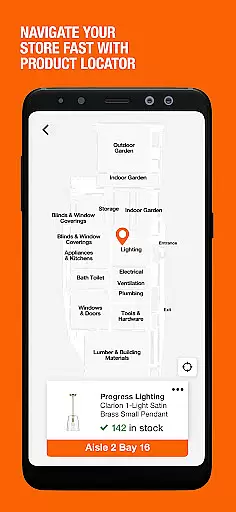
In addition to its innovative search capabilities, The Home Depot app provides a Product Locator feature that uses store mapping technology to guide shoppers directly to the aisle and bay where their desired product is located. This ensures a seamless shopping experience both in-store and online. Furthermore, users can access Ratings & Reviews instantly by scanning barcodes, empowering them to make informed purchasing decisions quickly.
The Home Depot app offers an array of features tailored to enhance the shopping experience. One notable feature is the ability to use your smartphone camera as a powerful shopping tool through Image Search. This function identifies items based on photographs, making it easier than ever to find exactly what you need without knowing its name or specifications.
Another significant aspect is the Product Locator, which acts like a GPS for your shopping list. By providing precise directions within stores, it saves time and effort when locating specific products. Additionally, the app supports account creation, allowing users to track orders in real-time, view past purchases, and enjoy instant checkout options. These functionalities combine convenience with efficiency, ensuring that whether you're renovating your home or tackling small projects, The Home Depot app has got you covered.
When it comes to shopping apps, product variety and clear categorization are essential for a seamless user experience. The Home Depot app excels in this area by offering over one million products that cater to various home improvement needs. Whether you're looking for tools, appliances, or gardening supplies, the app provides a comprehensive selection that ensures every shopper can find what they need.
The app's intuitive categorization system makes shopping more efficient. Products are logically grouped into distinct categories, allowing users to navigate through different sections with ease. This thoughtful organization saves time and enhances the overall shopping experience. With clear labels and well-structured menus, customers can quickly locate specific items or browse through related products without frustration.
One of the standout features is the Image Search capability, which revolutionizes how users find products. By simply snapping a picture, shoppers can identify items even if they don't know their names. This visual search function bridges the gap between physical stores and online shopping, making product discovery more accessible than ever before.
The benefits of such extensive product variety and smart categorization are numerous. Customers can make informed purchasing decisions while enjoying the convenience of mobile shopping. The ability to quickly find desired items, compare options, and read reviews empowers users to shop smarter and more efficiently. This comprehensive approach to product presentation sets The Home Depot app apart in the competitive shopping app market.
Pricing transparency and competitiveness are crucial factors in any shopping experience, and The Home Depot app addresses these aspects effectively. The app provides clear pricing information across its vast product range, enabling customers to make well-informed purchasing decisions. Users can easily compare prices, view special offers, and access exclusive app-only deals directly from their mobile devices.
The Home Depot app goes beyond basic price display by incorporating valuable features like Ratings & Reviews. Shoppers can instantly access feedback from other customers, including detailed insights about product value and performance. The barcode reader functionality adds another layer of transparency, allowing users to scan items in-store and compare online prices or read reviews before making a purchase decision.
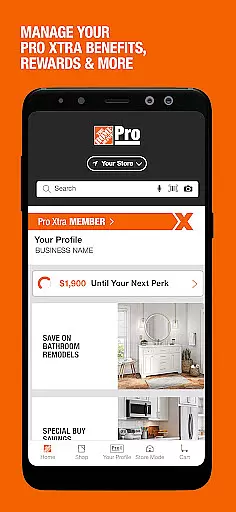
Special Buy promotions featured on the app's home screen offer daily opportunities to save on high-quality products. These limited-time offers, combined with the local ad section, provide users with up-to-date information about current deals and discounts. The app's pricing strategy is designed to remain competitive while offering additional value through instant checkout options and easy access to purchase history.
This transparent approach to pricing benefits customers by building trust and confidence in their buying decisions. The ability to quickly verify prices, check inventory, and review product information creates a fair shopping environment. By combining competitive pricing with valuable customer insights, The Home Depot app establishes itself as a reliable tool for finding the best deals in home improvement shopping.
User-friendly interface
Extensive product range
Innovative image search
Precise product locator
Instant checkout option
Limited international availability
Occasional bugs reported
Heavy reliance on internet
Some features require registration
Ads may be intrusive

Get rewarded for every purchase you make, online or in-store!
 4.60
4.60
Cash back on everything you need! Join now to start earning cash back!
4.60
Pet food, pharmacy, toys, apparel & more. Shop and save on pet care with Chewy.
4.90
Earn cash back and rewards from games, surveys, receipts and more
4.70
Buy now, pay later with flexible payments made to fit your budget.
4.00
Life’s easier in the eBay app—buy and sell millions of items on the go.
4.60
Lowe’s Knows Home Improvement
4.70
Create Wishes & Get Inspired
3.20
Earn and spend Shop Cash, boost balance & find top products from loved brands!
4.50
Shop stores, delivery & pickup
4.70
One app for easy journeys.
4.60
Shopping easy, fresh, and affordable just got easier.
4.50
NCPMobile is the easy and intuitive way to scan and transmit your purchases!
4.50
Save with Kroger! Coupons, ads, rewards, find stores & shopping list in one app!
4.50
Shop online now, pay later. Flexible payments made to fit your budget.
4.50
Shop. Earn. Redeem. Repeat!
4.30
TikTok Shop is an integrated e-commerce platform within the TikTok app, allowing users to discover and purchase products directly through short videos and live streams.
4.10
We constantly evaluate our app so you can have the best experience possible.
3.60
The GameStop app was built to make shopping for gamers even easier.
3.10


User Reviews