
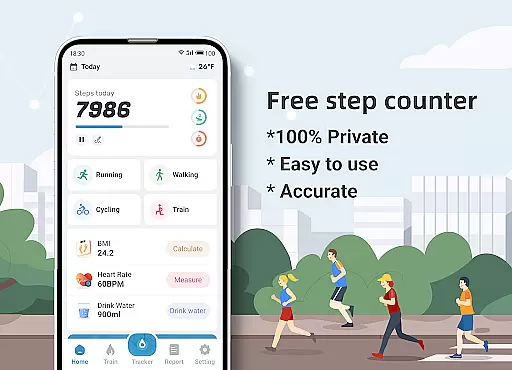
Step Counter - Pedometer & BMI is a comprehensive health and fitness application designed to track your daily steps, monitor BMI, and provide detailed activity reports. The app offers accurate step counting through its advanced pedometer functionality, making it an ideal tool for individuals looking to maintain an active lifestyle.
In addition to step tracking, the app provides features such as training plans, map tracking, and BMI calculation. These tools help users set fitness goals, monitor their progress, and make informed decisions about their health. Whether you are a casual walker or a dedicated fitness enthusiast, Step Counter ensures that you have all the necessary data to optimize your workouts.
The app emphasizes user privacy by ensuring that all personal data remains on the device and is not shared with third parties. With its user-friendly interface and customizable settings, Step Counter caters to both beginners and experienced fitness enthusiasts, providing a personalized experience that adapts to individual needs.
Step Counter - Pedometer & BMI stands out with its array of features tailored for health-conscious individuals. One of its primary functions is the ability to track steps accurately using the phone's built-in sensors. This feature allows users to monitor their daily activity levels without needing additional devices.
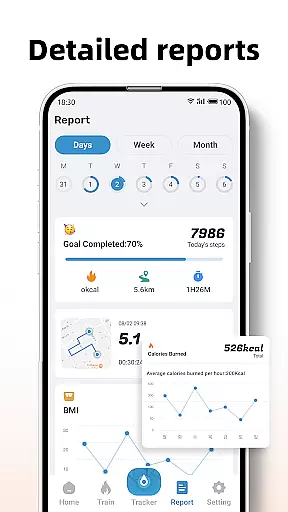
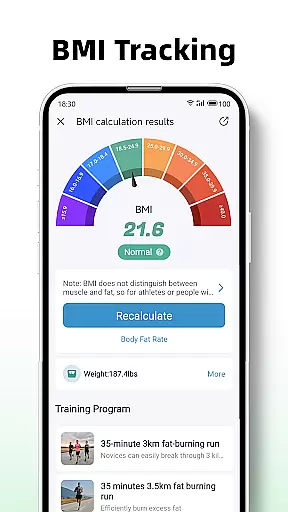
Beyond basic step counting, the app includes detailed reporting tools that generate graphs and charts for daily, weekly, and monthly activity data. Users can also access training plans designed to guide them through various fitness routines, from simple walking to more intense jogging sessions. Additionally, the app offers BMI tracking, which calculates body mass index to help users maintain optimal health.
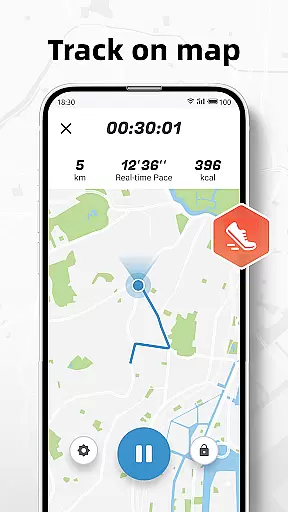
Another significant advantage is the map tracking feature, which displays the user's walking or running route. This function not only enhances the user experience but also provides valuable insights into workout patterns. With adjustable sensitivity settings and a strong commitment to privacy, Step Counter delivers a robust and secure fitness tracking solution.
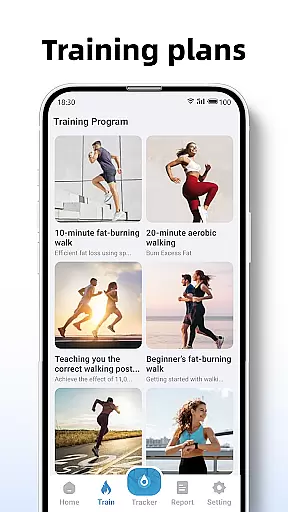
Personalized planning in fitness applications refers to the ability to tailor workout routines and health goals according to individual user needs. Step Counter - Pedometer & BMI excels in this area by offering customizable training plans that cater to different fitness levels and objectives.
The app provides various training modes, such as a 10-minute jogging plan, which users can select based on their preferences or fitness goals. These plans are not only about counting steps but also include tracking active time, distance covered, and calories burned during each session, ensuring a comprehensive approach to personal fitness management.
By integrating BMI tracking, the application further refines personalized planning. Users can calculate and monitor their Body Mass Index, allowing them to adjust their fitness strategies accordingly. This feature supports those aiming for weight loss or muscle gain by providing critical data points that inform their personalized health journey.
Ultimately, the true value of personalized planning in Step Counter lies in empowering users to take control of their health with tailored insights and actionable data. Whether you're a beginner taking your first steps towards fitness or an experienced athlete fine-tuning your regimen, this app adapts to provide relevant and effective guidance.
Progress visualization is a crucial component of any fitness app, serving as a motivational tool by presenting users' achievements in an easily digestible format. Step Counter - Pedometer & BMI offers detailed reports and graphs that display daily, weekly, and monthly activity data, making it simple for users to track their progress over time.
The app's reporting feature goes beyond mere numbers; it translates step counts, distances, and calorie burn into visual charts. This transformation of raw data into graphical representations allows users to quickly grasp their performance trends and make informed decisions about their fitness routines.
Moreover, the ability to visualize progress on a map adds another layer of engagement. As users walk or run, they can see their routes and distances covered, creating a more immersive experience. This spatial representation of activity not only tracks progress but also encourages exploration and variation in exercise paths.
With its commitment to privacy and accuracy, Step Counter ensures that all visualized data remains secure and reflective of true user efforts. By regularly updating these visuals, the app keeps users motivated and engaged, celebrating milestones and encouraging continued effort towards personal health goals.
User-friendly interface
Accurate step tracking
Detailed activity reports
Comprehensive training plans
Strong privacy protection
Limited to walking/running
No integration with wearables
Occasional accuracy issues
Basic social features
Device compatibility concerns

Your plan in your pocket 24/7
 3.00
3.00
“Overcoming pain based on EMDR” helps you to alleviate chronic pain and stress.
4.10
Using Recognise™ has been shown to reduce pain and improve performance.
4.3
Effortlessly and naturally release anxiety by harnessing the power of your brain
4.60
Find Paid Clinical Trials In Your Area
3.70
Step Counter, track steps when you walk or run
4.70
Monitor, analyze, track, and convert blood sugar & help you control diabetes.
4.10
Walk, track, and burn calories with step counter & GPS walking tracker
4.20
Track sleep cycle, relax with white noise, sleep sounds & smart alarm clock
3.80
App to stop smoking slowly or now with a motivational badges and helpful tips
4.80
When the night comes, we prepare your eyes for deep, sweet dreams
4.70
Load the bar with this barbell & plate calculator. It's leg day, not brain day!
4.70
Walk. Earn: Get rewarded for every step! Walk, move, and earn real rewards.
4.70
Point, scan, and unlock truth in every bite.
4.50
For Absolute Novices to Strength Training. Simple. Effective.
4.40
Looking to take control of your health? Our psychology-based programs can help.
4.10
Your Health Has Met Its App (℠)
3.90
Dexcom G7 Continuous Glucose Monitoring
3.70
The app helps you address digestive symptoms based on the Fast Tract Diet.
3.50


User Reviews