
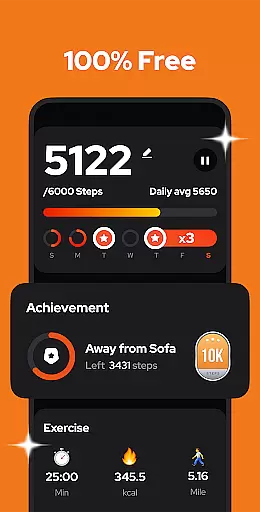
Step Counter - Pedometer is a premier health and fitness application designed to automatically track your daily steps, calories burned, walking distance, and duration with remarkable accuracy. Compatible with all Android devices, this app leverages advanced built-in exercise tracking technology without the need for GPS or Wi-Fi, ensuring efficient battery usage while providing reliable offline functionality. Whether you're aiming to hit the recommended 10,000 steps per day or simply monitoring your general activity levels, Step Counter offers an intuitive interface that makes staying fit straightforward and accessible.
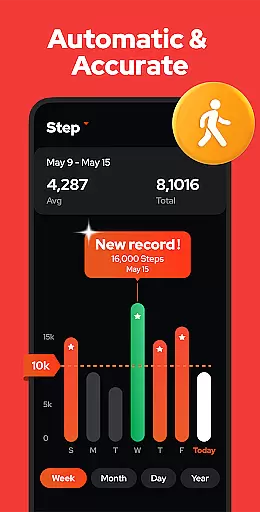
Beyond basic step counting, the app provides insightful graphs displaying your progress by day, week, month, or year, allowing users to analyze their exercise trends over time. With additional features such as adjustable sensitivity settings, pause and resume functions for step tracking, and comprehensive data backup options, Step Counter ensures a personalized and uninterrupted user experience. Its commitment to privacy and security means that all your data remains confidential, never shared with third parties, making it a trustworthy companion on your journey to better health.
Step Counter - Pedometer distinguishes itself through a variety of innovative features tailored to enhance your fitness tracking experience. One standout feature is its ability to function seamlessly offline, eliminating the dependency on Wi-Fi or cellular data while preserving battery life due to the absence of GPS tracking. This ensures that whether you're in an area with poor connectivity or simply prefer to keep data usage low, your step counts remain accurate and consistent.
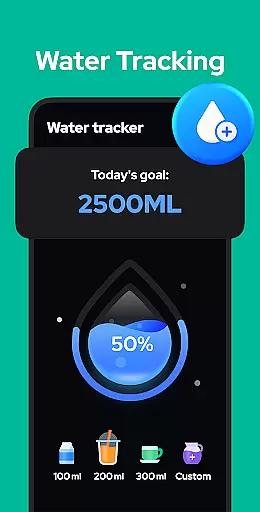
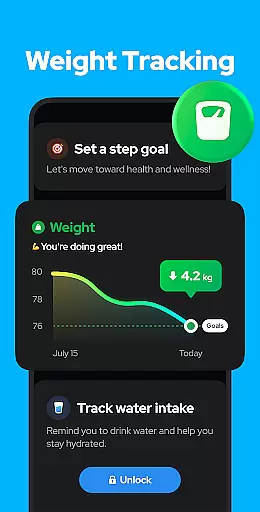
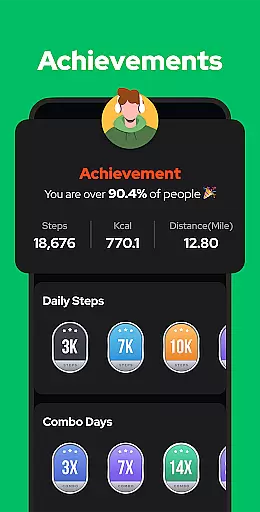
The app also boasts customizable settings such as adjustable sensitivity levels and the option to pause background step tracking when not needed, like during driving. Users can view detailed analytics presented in easy-to-understand graphs segmented by day, week, month, or year, offering insights into their walking habits and overall progress. Furthermore, upcoming enhancements promise even more personalization with planned features like drink water reminders, body weight recording, and achievements to motivate users further. These attributes collectively make Step Counter a versatile tool for anyone looking to maintain an active lifestyle while leveraging cutting-edge technology.
Personalized planning in a fitness app refers to the ability to create tailored exercise routines based on individual user data and goals. This feature is crucial for users who want to optimize their workouts according to their specific needs and progress.
Step Counter - Pedometer offers personalized planning by analyzing daily steps, walking duration, and calories burned. The app uses advanced algorithms to adjust step goals dynamically, ensuring that users are consistently challenged but not overwhelmed. This adaptive approach helps users maintain motivation and achieve better fitness outcomes.
Users benefit from this feature as it provides a customized experience that evolves with their fitness journey. By tracking trends over time, the app can suggest optimal step targets, helping users reach milestones such as 10,000 steps per day more effectively. This personalization ensures that each user's plan remains relevant and engaging.
The true value of personalized planning lies in its ability to transform generic step counting into a meaningful fitness strategy. With features like adjustable sensitivity and customizable training modes on the horizon, Step Counter - Pedometer continues to enhance its personalized offerings, making it an invaluable tool for anyone looking to improve their health through walking.
Progress visualization is a key component of any fitness application, allowing users to see their achievements and track improvements over time. Visual representations of data help users understand their performance trends and stay motivated to reach new goals.
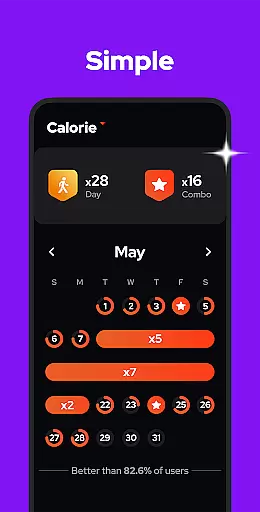
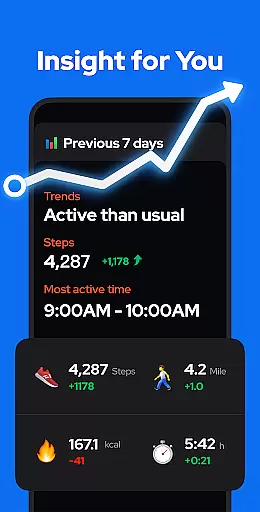
In Step Counter - Pedometer, progress visualization is implemented through detailed graphs and charts that display step counts, calories burned, walking distance, and duration. Users can view their data by day, week, month, or year, providing comprehensive insights into their activity patterns. These visual tools make it easy to identify peak performance periods and areas needing improvement.
The benefits of this feature include increased user engagement and accountability. By presenting clear evidence of progress, the app encourages consistent use and fosters a sense of accomplishment. Users can celebrate hitting milestones like 10,000 steps per day and set new objectives based on visible trends.
Step Counter - Pedometer stands out with its robust progress visualization capabilities. The app's commitment to accuracy and privacy ensures that users receive reliable data while maintaining control over their information. With upcoming features like achievements and health metric tracking, the app continues to expand its visualization tools, offering even more ways for users to monitor and celebrate their fitness journey.
User-friendly interface
Accurate step tracking
Offline functionality
Comprehensive data analysis
Privacy-focused design
Limited device compatibility
No wearable integration
Basic visual design
Occasional inaccuracies
Few social features

Power-lifting, weightlifting and Wendler 531 app to track your workout program.
 4.90
4.90
a fun app full of surprises :)
4.70
Using Recognise™ has been shown to reduce pain and improve performance.
4.4
Optimization for TRT & Enhanced Athletes
4.0
Get alert about getting out of desired heart rate zone.
4.10
50 HD sounds to help you relax during the day and sleep great at night!
4.40
Relax. Sleep Better. Feel Better.
4.50
The Crunch Mobile app - Find a gym, manage favorites, reserve & cancel classes.
4.60
Your personal BP tracking companion, focus on helping you achieve wellness goal.
4.10
Home workouts for fitness & fast bodybuilding at home - no equipment needed.
4.90
When the night comes, we prepare your eyes for deep, sweet dreams
4.70
Drink water reminder app. Track water intake. Smart simple hydration tracker.
4.70
Effortlessly and naturally release anxiety by harnessing the power of your brain
4.60
Eat smarter with Eato, your personal calorie counter and nutrition tracker!
4.40
beat yesterday.
4.00
Turn your steps into cash, gift cards & rewards with our step counting pedometer
3.80
Focus on BP & Health
3.80
Enjoy the Gluten Free living with the best app. SCAN the barcodes & SEARCH.
3.60
Use your watch as a bike computer, heart rate monitor and cycling power meter
2.50


User Reviews