
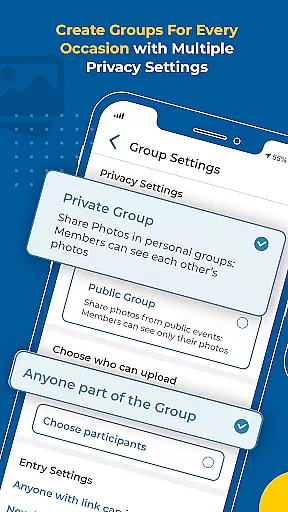


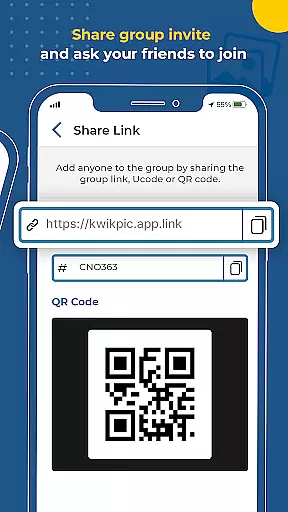
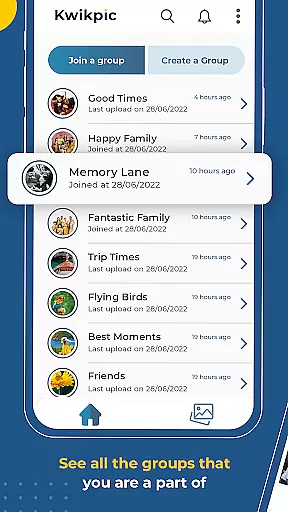
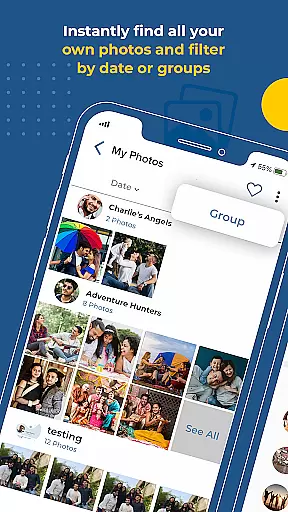
Kwikpic is an innovative photo management solution designed specifically for event organizers, photographers, and attendees who need efficient ways to handle large volumes of photos. The app's core functionality revolves around AI-powered face recognition technology that automatically sorts and delivers images to relevant individuals. This eliminates the tedious task of manual photo sorting, saving users significant time and effort.
Beyond its intelligent sorting capabilities, Kwikpic offers seamless sharing options across various platforms and devices. Users can instantly upload high-quality images from multiple sources including device galleries and cloud storage services like Google Drive. The app maintains original image quality while enabling features such as group photo discovery, automatic tagging, and instant notifications. These functions make it particularly valuable for managing photos from weddings, conferences, birthdays, and vacations where numerous participants require access to shared memories.
The application distinguishes itself through several key features that enhance the photo management experience. Its most prominent capability is the advanced facial recognition engine that accurately identifies and categorizes individuals across multiple images. This technology enables automatic tagging of people in photos and generates instant notifications to alert them about new images they appear in.
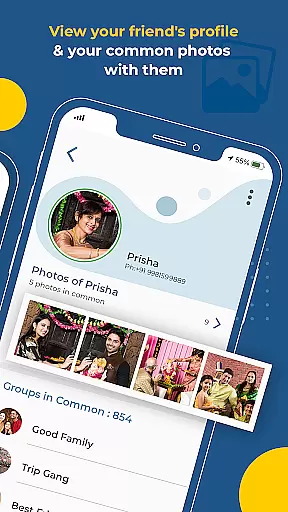
Another significant feature is the comprehensive analytics dashboard that provides detailed insights into photo engagement metrics. Users can track total impressions, download counts, and other valuable statistics about their shared images. Additionally, Kwikpic supports integration with various cloud storage platforms, allowing users to import and export photos without quality degradation. The app also facilitates group photo management by identifying common pictures among community members and enabling bulk sharing operations, making it especially useful for coordinating large-scale events and maintaining organized digital archives.
Creating and managing tasks within an application is crucial for effective event organization. Kwikpic offers a seamless way to handle photos by allowing users to instantly face match, tag, and notify individuals in pictures. This feature simplifies the process of sorting through countless photos from events such as weddings or conferences.
The app's AI technology ensures that every photo is effortlessly sorted and delivered to respective owners without any quality loss. Users can upload images directly from their gallery or cloud storage platforms like Google Drive. Once uploaded, the system automatically identifies faces and suggests tags, making it easy to customize details for each image.
This functionality not only saves time but also enhances user experience by providing precise control over how photos are managed and shared. With Kwikpic, you can easily track analytics such as total impressions and downloads, ensuring that your memories are well-organized and accessible to those who matter most.
Setting reminders is essential for staying on top of important events and deadlines. Kwikpic provides robust reminder features that help users manage their photo-sharing tasks efficiently. By leveraging advanced AI algorithms, the app ensures that no moment goes unnoticed by instantly notifying tagged individuals when new photos are available.
Users benefit from customizable notification settings that allow them to choose how and when they receive alerts about newly uploaded images. Whether itu2019s a wedding, conference, or vacation, Kwikpic keeps everyone connected by sending timely notifications so that all participants stay informed and engaged with the latest content.
Moreover, these reminder settings contribute significantly to maintaining active participation among group members. By keeping everyone updated with real-time information, Kwikpic fosters a sense of community and ensures that all special moments are captured and cherished collectively.
User-friendly interface
Advanced AI technology
Seamless cloud integration
High-quality image processing
Comprehensive analytics
Limited free storage
Subscription fees required
Occasional processing delays
Privacy concerns with facial data
Learning curve for new users

The calendar app in this 2026 year see all dates.
 4.20
4.20
Buy event tickets easily with our user-friendly App. Stay updated on hot events
4.1
Here you can choose tickets for films, performances, concerts and other events
4.60
Fantasy of Lights Event App
5.00
The KRUU app - plan, celebrate, remember
4.80
The world's largest selection of tickets is now at your fingertips
3.90
Events, Meetings, Photo Shoots
4.50
Freebie Games for Epic Games, Steam, Amazon, Rockstar etc.
4.40
TodayTix is the easiest way to get tickets to the best shows in your city.
4.90
Design Invitations & Cards for Any Occasion
4.80
Birthday Greetings provides Birthday Card, Frames, Gifs & Father's day Wishes
4.80
Create Wedding Invitation and Wedding Anniversary Cards using our app
4.60
Greeting card maker with photos best app| Birthday cards| All wishes eCards FREE
4.50
Everything you need for the Best Thursday Ever.
4.40
Manage all your events, leads, ticketing, payments and check-ins.
4.30
Rocket Monkey - Space rocket launch schedule for launch sites around the world
4.20
Some connections are better kept private
4.5
Browse events, find transportation, keep up with the latest news from your team
4.5
Thanksgiving Wishes, Thanksgiving Stickers & Animated GIF for Whatsapp Stickers
4.0


User Reviews