

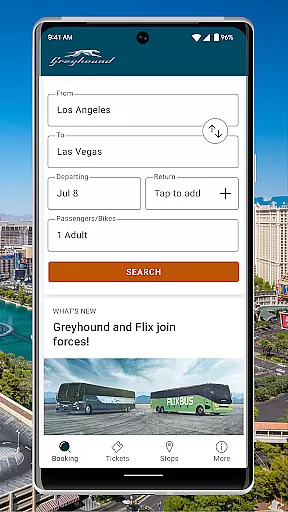
Greyhound is a premier travel application designed for booking low-fare bus tickets with enhanced flexibility and options. The app provides users with the ability to view and book schedules from multiple carriers, including Greyhound and FlixBus, ensuring access to the best available fares across North America. With features such as seat selection, users can choose their preferred seating on the bus for a small fee, adding convenience and personal preference to travel planning.
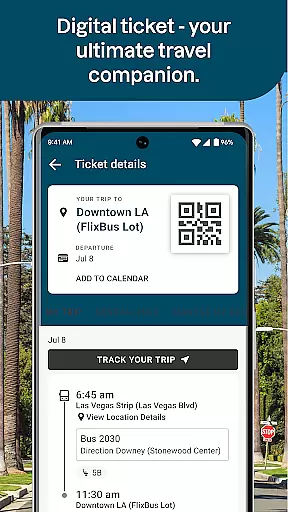
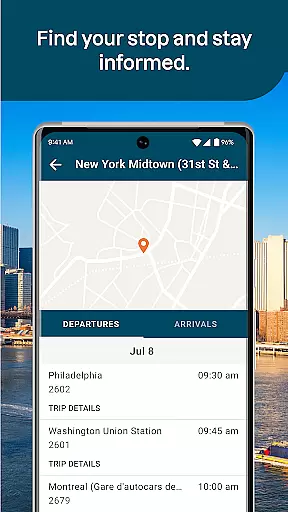
In addition to booking, the app offers live trip updates directly to your mobile device, keeping you informed about any changes or delays in real-time. Users can also take advantage of exclusive app-only discounts, enhancing savings opportunities. The app's digital ticketing system allows passengers to display their tickets directly from their smartphones, eliminating the need for paper tickets and check-ins. This comprehensive functionality makes Greyhound an essential tool for efficient and cost-effective travel.
The Greyhound app boasts a variety of innovative features tailored to streamline the travel experience. One standout feature is the integration of both Greyhound and FlixBus carrier schedules, providing users with more options and competitive pricing for their trips. The app's seat assignment functionality allows travelers to select their preferred seats, whether it be a window or aisle, for added comfort during long journeys.
Another key feature is the digital ticketing system, which displays tickets via a QR code directly within the app. This eliminates the hassle of printing tickets or checking in at a separate location. Additionally, users receive live updates about their trips, ensuring they are always aware of schedule changes or delays. Exclusive app-only discounts further enhance the value proposition, rewarding users for choosing the digital platform for their travel needs.
Ensuring the authenticity of bookings is crucial for any travel application, and Greyhound excels in this area. The app provides a seamless booking experience by allowing users to see and book schedules from both Greyhound and FlixBus carriers.
This means that customers have access to over 1900 bus routes across North America, with real-time updates directly available through the app. Whether you're traveling from Albany, NY to New York, NY or Los Angeles, CA to Phoenix, you can trust that your reservation is accurate and confirmed.
Additionally, Greyhound offers app-only discount offers, incentivizing users to book through their platform while ensuring all transactions are legitimate and secure. This commitment to transparency not only enhances user confidence but also simplifies the entire booking process.
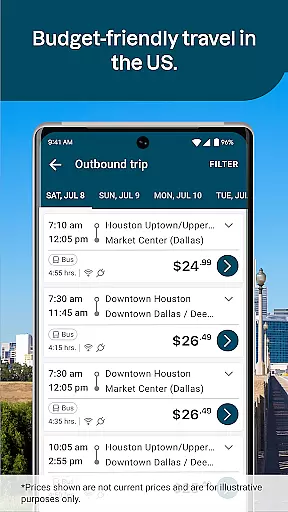
Price transparency is a key feature of the Greyhound app, ensuring that users have a clear understanding of their bus ticket costs. With the ability to view both Greyhound and FlixBus carrier schedules, customers can compare prices and find the lowest fares available for their trips.
The app also clearly outlines any additional fees, such as those associated with seat assignments. Users are informed upfront if they wish to choose a specific seat on the bus, allowing them to make an educated decision without hidden surprises at checkout.
Moreover, Greyhound's app-only discounts provide further savings opportunities, making it easier for travelers to budget their trips effectively. By offering comprehensive pricing information, Greyhound empowers users to plan their journeys confidently and economically.
User-friendly interface
Multiple carrier options
Live trip updates
Exclusive app discounts
Digital ticketing system
Seat selection fee
Limited international routes
Occasional bugs
Requires internet
Ads in free version

Iowa 511 is the Iowa Department of Transportation's traveler information app.
 3.80
3.80
Locate and navigate to local holiday displays
4.3
A tool for outdoor activities.
4.30
Listen live to pilots and air traffic controllers around the world
3.80
The travel app that makes booking cheap flights, hotels, and car rentals easy.
4.80
Get all MTA services, Subway, Bus, LIRR, Metro-North and More all in one place.
4.60
Bus tickets at unbeatable prices with routes across the US. All aboard FlixBus!
4.70
One app, 300,000+ travel experiences, tours, and tickets you’ll remember.
4.90
Find the perfect vacation rental. Search from over 2 million properties.
4.80
Replace your car trips with the world’s largest shared electric vehicle company.
4.90
Streamline your U.S. entry
4.90
Guest how you guest when you book one of our 6,800+ hotels and earn rewards.
4.90
Travel and Book 8,000+ Hotels Worldwide with the Marriott Bonvoy™ app.
4.90
Stay at Motel 6 for less - book fast, save more with MY6 app!
4.70
Maps, Wait Times, Park Hours
4.40
GPS Live Satellite Earth to find route navigation and current location map
4.00
Examine the planet
3.80
Find the best prices, pay for the cheapest gas, and save on every fill up
3.30
OFFLINE detailed information about the Florida National and State Parks
4.2


User Reviews