
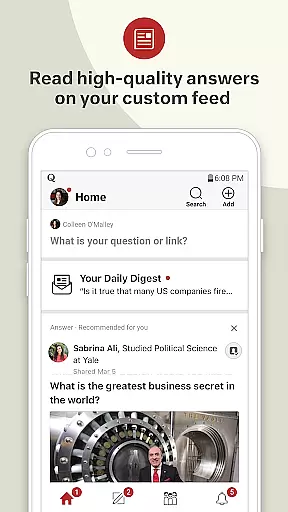
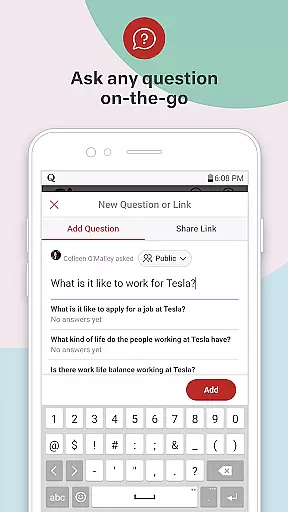
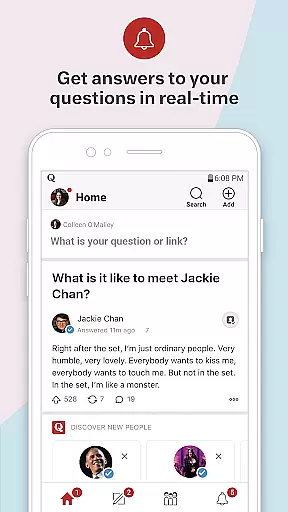

Quora is a premier Q&A platform designed to help users share and expand global knowledge. At its core, the app allows individuals to ask questions on any topic and receive well-researched, personalized answers from credible sources. It also enables users to follow topics of interest, browse through high-quality content, and learn directly from experts with first-hand experience. Available on both mobile and desktop platforms, Quora serves as an essential tool for those seeking reliable information and wishing to contribute their own expertise to a growing community. Its value lies in fostering a deeper understanding of the world by connecting curious minds with knowledgeable contributors.
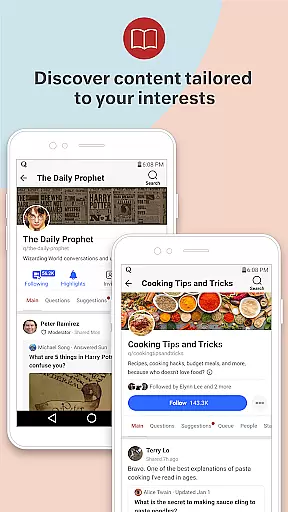
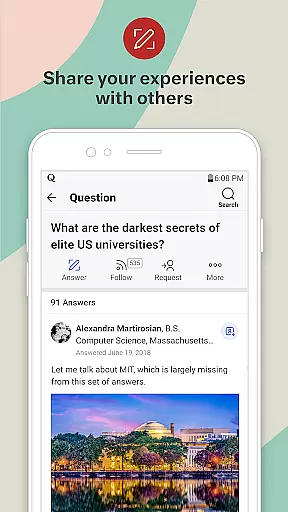
One of Quora's standout features is its ability to deliver relevant content tailored to individual preferences. By leveraging advanced algorithms, the platform ensures that users are presented with questions and answers aligned with their interests. Additionally, it provides a seamless interface for sharing one’s own insights, making it not just a place to consume knowledge but also to actively participate in its creation. Whether you're looking to solve a specific query or simply explore diverse topics, Quora offers a comprehensive solution for knowledge seekers worldwide.
Quora stands out due to its robust set of features that cater to various user needs. First and foremost, the platform offers a highly intuitive question-and-answer system where users can pose queries on virtually any topic imaginable. The app aggregates responses from experts and enthusiasts alike, ensuring that users receive diverse perspectives on their questions. This feature is particularly valuable for those seeking credible, well-rounded answers.
Another key aspect of Quora is its sophisticated content personalization engine. By analyzing user behavior and preferences, the app curates a feed of topics and questions that align with individual interests. Users can further customize their experience by following specific topics, writers, or boards, allowing them to dive deeper into areas they care about most. Additionally, Quora supports multimedia content integration, enabling users to enhance their answers with images, videos, and links, thus providing richer, more engaging responses.
Finally, Quora fosters community interaction through features like upvoting, commenting, and sharing. These social elements not only improve content visibility but also encourage meaningful discussions among users. With its seamless cross-platform functionality, Quora ensures that users can access and contribute to this vast repository of knowledge anytime, anywhere, making it an indispensable tool for continuous learning and intellectual growth.
In the realm of information, credibility and diversity of sources form the bedrock of a reliable news platform. Quora stands out by aggregating knowledge from a vast array of individuals, including experts, professionals, and everyday people with unique experiences.
Quora's design enables users to follow topics and credible people, ensuring that the content they consume comes from varied and trustworthy sources. This diverse aggregation of perspectives ensures that users are not siloed into a single viewpoint but are exposed to a broad spectrum of thoughts and analyses.
The platform's commitment to personalized and relevant content means that users receive answers and insights tailored to their interests and questions, enhancing both the depth and breadth of their understanding across numerous subjects.
Accuracy in content delivery is paramount, especially when it involves disseminating information on a wide array of topics. Quora addresses this need by fostering an environment where content undergoes organic peer review.
Users can evaluate the quality and reliability of answers based on upvotes, downvotes, and direct feedback from the community. This system incentivizes contributors to provide accurate, well-researched, and insightful responses.
Moreover, Quora allows users to learn from credible people with first-hand knowledge, adding another layer of reliability. The ability for anyone to ask questions and get helpful answers further enriches this ecosystem, making Quora a dynamic tool for acquiring verified and diverse knowledge.
User-friendly interface
High-quality content
Personalized feed
Expert contributions
Active community
Occasional misinformation
Ads can be intrusive
Limited offline access
Variable answer quality
Privacy concerns

Go beyond the breaking new
 4.90
4.90
Stream Action News and get customized breaking news and AccuWeather alerts.
4.00
Live, Sport, Podcasts & Video
3.60
Get fact-based, unbiased news coverage 24/7 with the NewsNation app.
3.20
Listen to Live Police and Fire Radio! Stay informed by Police Scanner
3.80
400+ News Channels. Local, Live & World Coverage. All the News in Just One Click
4.30
Breaking News delivers real-time updates, personalized content, and local news.
4.60
Watch the latest daily US & world reports live, with national & global updates
3.20
Live Breaking News & Alerts. Police, Fire, Weather Radios, Air Traffic, & more.
4.80
See every side of every story
4.70
Join the Neighborhood
4.70
Watch MS NOW videos and stream audio from the team formerly known as MSNBC.
4.60
Discover Taiwan Through News, Entertainment & Culture
4.50
Breaking news alerts, headlines and live video from NBC News
4.50
Stay informed on the day’s breaking news, live updates, and headlines with CNN.
4.40
Latest World News | Accurate Forecast | Real-time Alert | Smart & Fast
4.40
OneWire News: Real-time news, local updates, and weather at your fingertips.
4.00
Trusted sources, breaking headlines, and local stories all in one place.
3.70
Get the latest in politics, breaking news, world events, finance and health.
3.10


User Reviews