
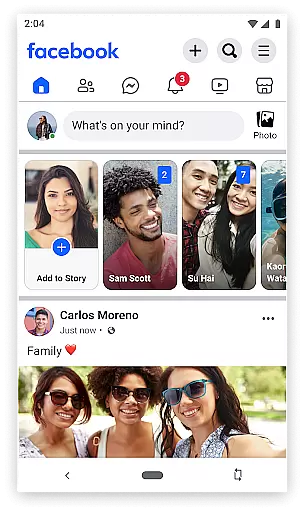
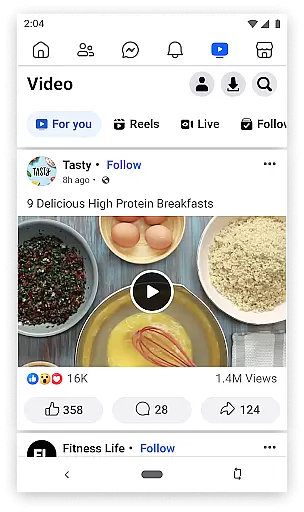


Facebook Lite is a streamlined version of the classic Facebook app, designed specifically for users with limited storage space or those operating in 2G network conditions. This social networking app allows you to stay connected with friends and family while using minimal data and phone storage. With its lightweight design, the app ensures smooth performance even on less powerful devices.
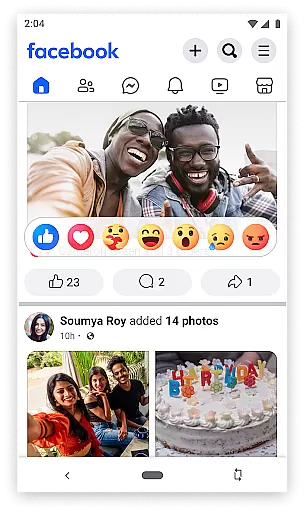
The app retains many essential Facebook features such as posting status updates, sharing photos, liking posts, and interacting with friends through comments and reactions. It also supports local event discovery, photo album creation, and following favorite brands or celebrities. Whether you want to share life updates or keep up with global news, Facebook Lite delivers a simplified yet effective social media experience.
One key scenario where Facebook Lite shines is in areas with poor internet connectivity. Users can effortlessly browse their News Feed, interact with posts, and maintain their social presence without requiring high-speed internet. This makes it an invaluable tool for staying connected regardless of technical limitations, providing real value to users who need reliable access to social networking.
Facebook Lite offers a range of features that cater to users looking for a lighter version of the standard Facebook app. The app focuses on core functionalities such as finding friends and family, posting status updates, and sharing photos or memes. Its efficient design ensures that these features work seamlessly even under low bandwidth conditions, making it ideal for users in regions with limited internet access.
A standout feature of Facebook Lite is its notification system, which alerts users when friends like or comment on their posts. Additionally, the app enables users to discover and RSVP to local events, follow brands or celebrities for updates, and explore local businesses with reviews and pictures. These capabilities ensure that despite its reduced size, the app remains highly functional and engaging.
Another innovative aspect is its integration with Facebook Marketplace, allowing users to buy and sell locally. The app also lets users organize photos into albums and control privacy settings for individual images. By focusing on simplicity and usability, Facebook Lite proves itself as a versatile tool for maintaining social connections without compromising device performance.
User profile customization and authenticity verification are essential features in any social networking app, including Facebook Lite. These features allow users to create a personalized online presence while ensuring the credibility of interactions within the platform.
Facebook Lite offers a streamlined version of profile customization options that enable users to showcase their interests, life events, and photos. Despite being a lighter version of the main app, it still allows for significant personalization, such as updating profile pictures, cover photos, and personal information, which helps maintain an authentic representation of the user.
The authenticity verification process is crucial for maintaining trust and safety on the platform. Facebook Lite employs various methods to verify the identity of its users, reducing the likelihood of fake accounts and enhancing the overall user experience. This ensures that when users connect with friends or follow new people, they can be confident in the legitimacy of those profiles.
By providing these robust features, Facebook Lite not only facilitates meaningful connections but also fosters a secure environment where users feel comfortable sharing their stories and engaging with others.
Connection discovery is a pivotal feature in social apps like Facebook Lite, designed to help users find and connect with friends, family, and communities that matter to them. This feature leverages algorithms to suggest potential connections based on mutual friends, shared interests, and other relevant factors.
In Facebook Lite, connection discovery is optimized for performance and efficiency, even in areas with limited internet connectivity. The app suggests friends by analyzing existing contacts and social networks, allowing users to quickly expand their circles without compromising speed or data usage.
Moreover, Facebook Lite enhances connection discovery by integrating local event suggestions and community pages, making it easier for users to engage with their surroundings and participate in social activities. This aspect of the app encourages real-world interactions and strengthens community bonds.
Overall, the connection discovery feature in Facebook Lite plays a vital role in enriching the user's social experience, ensuring that they remain connected to their world, regardless of their location or network conditions.
Lightweight design
Low data usage
Works on 2G networks
Quick installation
Essential Facebook features
Limited advanced features
No video calling
Fewer customization options
Reduced visual quality
Less frequent updates

Global short video platform: epic effects, trending videos & vibrant community!
 4.40
4.40
Positive social
4.20
Watch, Edit, Upload and Share Gaming Clips
4.00
The video chat to meet people in the blink of an eye!
3.90
Dating for singles. Meet lonely people nearby online. Find your match here!
4.20
Social App Used By Millions
4.40
Chat and make new friends around the world!
3.90
Resonate & Date with New Match
3.70
Live Chat & Match! Explore Real-Time Dating and Make Friends!
4.40
The hottest live chat app so far. Video chat and meet great people...
4.60
Social calendar for friends to make plans, group chat, share events & schedules
4.60
A video app from OpenAI - AI video generation by the maker of ChatGPT
4.60
Match, chat & date with singles nearby. The dating app to find true love
4.50
Calling and texting app. 2nd virtual line plus new phone number. Txt & talk now.
4.40
Free texting (SMS) to US, Canada & more. Free new number. Call free & Text free.
4.30
Unlimited messages, WiFi Calling, Texting app. Text now with Second Phone Number
4.10
Instant messaging — simple, fast, secure, and synced across all your devices.
4.00
Instant video chat with cool people. Live video call & make friends with Monkey!
3.80
Find your next obsession.
3.50


User Reviews