





Amazon Shopping is a comprehensive mobile shopping application that offers users an enhanced shopping experience compared to desktop browsing. The app provides real-time package tracking, delivery notifications, and the ability to view products from all angles using 360-degree imaging and augmented reality features. Users can also receive alerts for price drops on saved items, sign in securely with facial or fingerprint recognition, and access 24/7 live chat support. With its intuitive interface and advanced features, Amazon Shopping makes online shopping faster, easier, and more interactive.
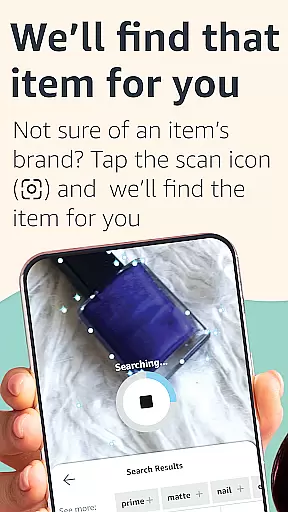
The app's innovative functionalities extend to product discovery through image scanning, making it simple to find items even without knowing their brand names. It supports international shipping to over 100 countries and integrates seamlessly with social networks for easy sharing. Whether you're managing orders, reading reviews, or exploring new products, Amazon Shopping delivers a superior user experience tailored for today's digital shopper.
Amazon Shopping stands out with its array of sophisticated features designed to streamline the shopping process. One notable feature is the real-time package tracking system, which keeps users informed about their shipment status and estimated delivery times. Additionally, the app's 360-degree product view and 'View in Your Room' functionality leverage augmented reality to help customers make informed purchasing decisions by visualizing products in their own space.
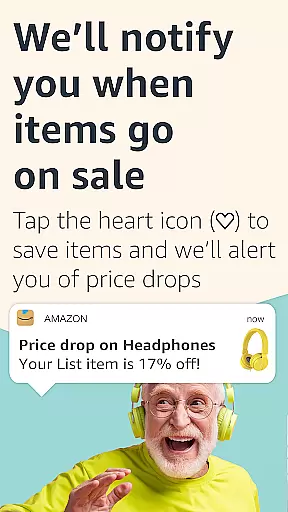
Another significant aspect is the app's ability to notify users of price reductions on wishlisted items, ensuring they never miss a bargain. Security is prioritized with biometric login options, while the always-available live chat support ensures assistance is at hand whenever needed. Furthermore, the integrated scanning tool allows users to search for products simply by capturing images or barcodes, thus simplifying the search process significantly.
Amazon Shopping stands out in the realm of e-commerce by offering an extensive array of products that cater to virtually every need and interest. With millions of items across numerous categories, users can explore a vast selection ranging from everyday essentials to unique finds.
The app's intuitive interface allows for seamless navigation through these categories. Users can easily filter searches based on specific criteria such as brand, price range, customer ratings, and more, ensuring they find exactly what suits their preferences.
Moreover, Amazon's sophisticated algorithms provide personalized recommendations tailored to individual shopping habits. This feature not only enhances the shopping experience but also helps customers discover new products they might love.
By providing comprehensive product details alongside genuine customer reviews, Amazon empowers shoppers with all the necessary information to make informed purchasing decisions. The ability to view items from every angle using 360-degree imagery further solidifies trust in the quality and appearance of potential purchases.
One of Amazon Shopping's core strengths lies in its commitment to pricing transparency and competitive rates. Customers are assured access to real-time pricing data across millions of products, enabling them to compare prices effortlessly and secure the best deals available.
The platform frequently updates its listings with current market trends, ensuring that prices remain fair and attractive. Additionally, exclusive app-only discounts and promotions offer added value, making it easier for users to save money while enjoying premium products.
Price drop alerts serve as another valuable tool within the app. By tapping the heart icon next to desired items, shoppers receive notifications when those products go on sale or experience significant price reductions. This proactive approach ensures no bargain is missed.
Furthermore, Amazon's A-to-z Guarantee provides peace of mind regarding transactions. Should any issues arise concerning pricing discrepancies or unsatisfactory purchases, customers have recourse to resolution processes designed to protect their interests and uphold fairness throughout the shopping journey.
User-friendly interface
Augmented reality viewing
Real-time tracking
Secure authentication
Global shipping options
Requires multiple permissions
Occasional bugs reported
Heavy data usage
Limited offline functionality
Push notification overload

Buy shoes, apparel, and luxury items. Shop and discover the latest sneakers!
 4.40
4.40
Grooming, Training & Shopping
3.80
Shop clothes, shoes, bedding, home & more. Save with exclusive deals & rewards!
4.20
Harbor Freight Coupons - Generators, Air Compressors, Tool Storage, and More.
4.70
Earn Cashback and maximize your savings when you shop and book your travel plans
3.90
wholesale stores
4.10
Shop stores, delivery & pickup
4.70
Furniture, Décor & Design Tips
4.80
The Live Shopping Marketplace
4.60
Measure your PD and try on frames virtually | Gift yourself the perfect pair!
4.80
New styles & exclusive offers
4.80
An easy Secret Santa & gift exchange planner - Simplify your gift shopping!
4.80
Buy fashion, beauty, home, & more! Save with amazing shopping deals & discounts.
4.80
Shop anywhere, manage payments, get cashback, discover Klarna Card & more.
4.80
Online shopping & digital coupons. Deals & local weekly ad in your myDG account
4.70
Life’s easier in the eBay app—buy and sell millions of items on the go.
4.60
Save up to 70% on the things you need every day
4.40
Shop fashion, shoes, home, designer handbags, beauty & more on the Belk app.
4.00
Shop with ease and save more; whether at home or in store!
3.60


User Reviews